 |
Cheat Engine
The Official Site of Cheat Engine
|
| View previous topic :: View next topic |
| Author |
Message |
Corroder
Grandmaster Cheater Supreme
 Reputation: 75 Reputation: 75
Joined: 10 Apr 2015
Posts: 1668
|
 Posted: Mon Oct 05, 2020 11:35 pm Post subject: Color, Pen, Brush Mode And Style Posted: Mon Oct 05, 2020 11:35 pm Post subject: Color, Pen, Brush Mode And Style |
 |
|
Hi, my question (on CE 7.1)
1. Color (in Lua)
example:
| Code: | form.Color = 'clRed' --> this is not work
or
form.Color = clRed --> this is not work
or
form.Color = 0xff --> this is work
or
form.Color = 255 --> this is work
|
Why I can not use 'clRed' or clRed?. Is it a bug?
Of course, I can make reference substitution like clRed = 0xfff, clBlack = 0, etc, but I mean is to use the color name directly as provided by CE.
2. Canvas Pen and Brush
Example
| Code: | Canvas.Brush.Style = 'bsSolid' --> not work
Canvas.Brush.Style = 0 --> work
Canvas.Brush.Color = 'clBlack' --> not work
Canvas.Brush.Color = clBlack --> not work
Canvas.Brush.Color = 0 --> work
|
Same question with No.1
3. Where I can find Canvas Brush and Pen Style complete Code Numbers?.
I need to know code for Pen.Mode = pmXor and Pen.Mode = pmCopy.
4. With these script
| Code: | if f then f.Destroy() end
f=createForm()
f.setSize(300,300)
local down=1
local startX, startY
f.OnMouseDown=function()
x,y = f.ScreenToClient(getMousePos())
startX = x
startY = y
down=0
end
f.OnMouseUp=function()
down=1
end
f.OnMouseMove=function()
local x,y=f.ScreenToClient(getMousePos())
if down==0 then
f.caption = startX..' '..startY..' '..x..' '..y
--f.Canvas.Clear()
f.Canvas.Pen.Color = 0xff
f.Canvas.Pen.Width = 1
f.Canvas.Brush.Color = f.color
f.Canvas.Brush.Style = 0
f.Canvas.TransparentColor = 0
f.Canvas.ellipse(startX, startY, x, y)
end
end
|
How I can draw perfect ellipse or rectangle without clear the canvas ?.
| Description: |
|
| Filesize: |
21.27 KB |
| Viewed: |
1835 Time(s) |

|
_________________
Stealing Code From Stolen Code...
And Admit It.. Hmmm....Typically LOL |
|
| Back to top |
|
 |
Dark Byte
Site Admin
 Reputation: 473 Reputation: 473
Joined: 09 May 2003
Posts: 25918
Location: The netherlands
|
| Posted: Tue Oct 06, 2020 1:15 am Post subject: |
|
|
1: clRed is just an integer value. But next version will have it defined in defines.lua
2: same. Color is an integer, not a enum or typeset so no string
3: lazarus. type in pmXor , hold shift and click it
(i'll try to document it)
edit:
| Code: |
TFPPenMode = (pmBlack, pmWhite, pmNop, pmNot, pmCopy, pmNotCopy,
pmMergePenNot, pmMaskPenNot, pmMergeNotPen, pmMaskNotPen, pmMerge,
pmNotMerge, pmMask, pmNotMask, pmXor, pmNotXor);
|
so:
| Code: |
pmBlack=0
pmWhite=1
pmNop=2
pmNot=3
pmCopy=4
pmNotCopy=5
pmMergePenNot=6
pmMaskPenNot=7
pmMergeNotPen=8
pmMaskNotPen=9
pmMerge=10
pmNotMerge=11
pmMask=12
pmNotMask=13
pmXor=14
pmNotXor=15
|
4: draw a blank ellipse over the last drawn one before drawing the new ellipse
or when you start dragging create a copy of the image and while moving draw the original image before you draw.
when released you can destroy the original
_________________
Tools give you results. Knowledge gives you control.
Like my help? Join me on Patreon so i can keep helping |
|
| Back to top |
|
|
Corroder
Grandmaster Cheater Supreme
Reputation: 75
Joined: 10 Apr 2015
Posts: 1668
|
| Posted: Tue Oct 06, 2020 2:05 am Post subject: |
|
|
Great, DB. Thanks for all information and tutorial.
So, we are waiting for new updates in next CE Version.
Good luck...
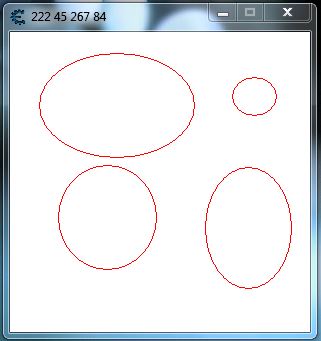
EDIT: No.4
Done, but I must set the brush color to form color.
| Code: | if f then f.Destroy() end
f=createForm()
f.setSize(300,300)
f.Transparent = true
f.Position = 'poScreenCenter'
f.Caption = ''
f.Color = 0xffffff
local down=1
local startX, startY, endX, endY
f.OnMouseDown=function(sender, button, x, y)
down=0
startX = x
startY = y
endX = x
endY = y
end
f.OnMouseUp=function(sender, button, x, y)
down=1
end
f.OnMouseMove=function(sender, button, x, y)
local x,y=f.ScreenToClient(getMousePos())
if down==0 then
f.caption = startX..' '..startY..' '..x..' '..y
f.Canvas.Brush.Color = f.Color
f.Canvas.TransparentColor = 0xffffff
f.Canvas.Pen.Width = 1
f.Canvas.Pen.Color = f.Canvas.Brush.Color
f.Canvas.ellipse(startX, startY, endX, endY)
f.Canvas.Pen.Color = 0xff
f.Canvas.ellipse(startX, startY, x, y)
end
endX = x; endY = y
end
|
| Description: |
|
| Filesize: |
22.74 KB |
| Viewed: |
1808 Time(s) |
|
_________________
Stealing Code From Stolen Code...
And Admit It.. Hmmm....Typically LOL |
|
| Back to top |
|
|
|
|
You cannot post new topics in this forum
You cannot reply to topics in this forum
You cannot edit your posts in this forum
You cannot delete your posts in this forum
You cannot vote in polls in this forum
You cannot attach files in this forum
You can download files in this forum
|
|
 FAQ
FAQ Search
 Memberlist
 Usergroups
 Register
 Profile
 Log in to check your private messages
 Log in


