 |
Cheat Engine
The Official Site of Cheat Engine
|
| View previous topic :: View next topic |
| Author |
Message |
Corroder
Grandmaster Cheater Supreme
 Reputation: 75 Reputation: 75
Joined: 10 Apr 2015
Posts: 1668
|
 Posted: Thu Jul 02, 2020 4:45 am Post subject: Menu On Panel Posted: Thu Jul 02, 2020 4:45 am Post subject: Menu On Panel |
 |
|
Can we create menu item on panel?.
Because if CE form border set to 'bsNone' then no chance to add menu item to a panel on the form.
Of course, we can use a trick by make a panel and label or sub panel as menu item, but I want to know how to add 'Main menu' or 'Pop up menu' on a panel.
_________________
Stealing Code From Stolen Code...
And Admit It.. Hmmm....Typically LOL |
|
| Back to top |
|
 |
AylinCE
Grandmaster Cheater Supreme
 Reputation: 39 Reputation: 39
Joined: 16 Feb 2017
Posts: 1574
|
| Posted: Thu Jul 02, 2020 7:42 am Post subject: |
|
|
hi @Corroder ..
Can you give an example of adding a "Menu" to a normal panel?
I just want to get an idea about the question.
_________________
|
|
| Back to top |
|
|
Corroder
Grandmaster Cheater Supreme
Reputation: 75
Joined: 10 Apr 2015
Posts: 1668
|
| Posted: Thu Jul 02, 2020 10:17 am Post subject: |
|
|
| Aylin wrote: | hi @Corroder ..
Can you give an example of adding a "Menu" to a normal panel?
I just want to get an idea about the question. |
This is just an easy example for the custom menu logic using panels and labels, remain code is up to you to customize it.
| Code: | if f then f.destroy() end
f = createForm()
f.Caption = 'Custom Menu'
f.Position = 'poScreenCenter'
p = createPanel(f)
p.setSize(f.width,20)
p.setPosition(0,0)
p.Color = 2372490
menuLabel = {}
menuPanel = {}
cleft1 = 10
cleft2 = 0
for i = 1, 5 do
table.insert(menuLabel, createLabel(p))
menuLabel[i].Top = 2
menuLabel[i].Left = cleft1
menuLabel[i].Font.Size = 8
menuLabel[i].Font.Color = 16777215
menuLabel[i].Cursor = -21
table.insert(menuPanel, createPanel(f))
menuPanel[i].Top = 20
menuPanel[i].Left = cleft2
menuPanel[i].setSize(100,50)
menuPanel[i].Color = 11788021
menuPanel[i].Visible = false
cleft1 = menuLabel[i].Left + menuLabel[i].Width + 40 -- adjust here
cleft2 = cleft1
end
menuLabel[1].Caption = '&File'
menuLabel[2].Caption = 'E&dit'
menuLabel[3].Caption = 'Fil&ter'
menuLabel[4].Caption = '&Help'
menuLabel[5].Caption = '&About'
subMenu1Item = createLabel(menuPanel[1]) -- or create panel
subMenu1Item.setPosition(5,5)
subMenu1Item.Font.Size = 8
subMenu1Item.Font.Color = 0
subMenu1Item.Caption = 'Bla bla bla'
subMenu1Item.Cursor = -21
-- and so on
function enterMenuItem(sender)
sender.Font.Color = 15570276
end
function leftMenuItem(sender)
sender.Font.Color = 16777215
end
function Menu1_click()
menuPanel[1].Visible = true
menuLabel[1].Font.Color = 15570276
menuPanel[2].Visible = false
menuPanel[3].Visible = false
menuPanel[4].Visible = false
menuPanel[5].Visible = false
end
function Menu2_click()
menuPanel[1].Visible = false
menuPanel[2].Visible = true
menuLabel[2].Font.Color = 15570276
menuPanel[3].Visible = false
menuPanel[4].Visible = false
menuPanel[5].Visible = false
end
function subMenu1Item_click()
menuLabel[1].Font.Color = 16777215
menuPanel[1].Visible = false
showMessage('Menu [File>Bla bla bla] has clicked')
return
end
for i = 1, 5 do
menuLabel[i].OnMouseEnter = enterMenuItem
menuLabel[i].OnMouseLeave = leftMenuItem
end
menuLabel[1].OnClick = Menu1_click
subMenu1Item.OnClick = subMenu1Item_click
menuLabel[2].OnClick = Menu2_click
f.show() |
_________________
Stealing Code From Stolen Code...
And Admit It.. Hmmm....Typically LOL |
|
| Back to top |
|
|
AylinCE
Grandmaster Cheater Supreme
Reputation: 39
Joined: 16 Feb 2017
Posts: 1574
|
| Posted: Mon Jul 06, 2020 11:45 am Post subject: Re: Menu On Panel |
|
|
I apologize for being late, my friend.
It may be a different answer than the question you asked.
I just wanted to add a different idea to the panel and menu topic.
You can try the code below.
| Code: | if f then f.destroy() end
f = createForm()
f.Caption = 'Custom Menu'
f.Position = 'poScreenCenter'
f.setSize(430, 300)
local p = createPanel(f) p.setSize(f.width,37) p.setPosition(0,0) p.Color=2372490
local bar = createPanel(p) bar.setSize(80,8) bar.setPosition(5,28) bar.Color=0xFFFFFF
local p1=createPanel(p) p1.setSize(80,25) p1.setPosition(5,0)
local p2=createPanel(p) p2.setSize(80,25) p2.setPosition(90,0)
local p3=createPanel(p) p3.setSize(80,25) p3.setPosition(175,0)
local p4=createPanel(p) p4.setSize(80,25) p4.setPosition(260,0)
local p5=createPanel(p) p5.setSize(80,25) p5.setPosition(345,0)
function PanelMouse(pName, cpt)
local clr=0x000000 local clr1=0x505050 pName.Font.Color=0xFFFFFF pName.Color=clr
pName.caption=cpt pName.Font.Style="fsBold"
pName.OnMouseMove=function() pName.color=clr1 end
pName.OnMouseLeave=function() pName.color=clr end
end
PanelMouse(p1, "File") PanelMouse(p2, "Edit") PanelMouse(p3, "Filter")
PanelMouse(p4, "Help") PanelMouse(p5, "About")
------------------- Menu Bar thanks = @Lynxz Gaming .. --------------------
local barspeed=5 local barpath=1
if barTimer then barTimer.Destroy() end
barTimer=createTimer(f)
barTimer.Interval=5
barTimer.Enabled=false
function barAnimation()
if barpath==1 then
if bar.left < p1.left then
bar.left = bar.left + barspeed
bar.height = 3
bar.top = 31
elseif bar.left > p1.left then
bar.left = bar.left - barspeed
bar.height = 3
bar.top = 31
elseif bar.left == p1.left then
bar.height = 8
bar.top = 28
barTimer.Enabled=false
end
end
if barpath==2 then
if bar.left < p2.left then
bar.left = bar.left + barspeed
bar.height = 3
bar.top = 31
elseif bar.left > p2.left then
bar.left = bar.left - barspeed
bar.height = 3
bar.top = 31
elseif bar.left == p2.left then
bar.height = 8
bar.top = 28
barTimer.Enabled=false
end
end
if barpath==3 then
if bar.left < p3.left then
bar.left = bar.left + barspeed
bar.height = 3
bar.top = 31
elseif bar.left > p3.left then
bar.left = bar.left - barspeed
bar.height = 3
bar.top = 31
elseif bar.left == p3.left then
bar.height = 8
bar.top = 28
barTimer.Enabled=false
end
end
if barpath==4 then
if bar.left < p4.left then
bar.left = bar.left + barspeed
bar.height = 3
bar.top = 31
elseif bar.left > p4.left then
bar.left = bar.left - barspeed
bar.height = 3
bar.top = 31
elseif bar.left == p4.left then
bar.height = 8
bar.top = 28
barTimer.Enabled=false
end
end
if barpath==5 then
if bar.left < p5.left then
bar.left = bar.left + barspeed
bar.height = 3
bar.top = 31
elseif bar.left > p5.left then
bar.left = bar.left - barspeed
bar.height = 3
bar.top = 31
elseif bar.left == p5.left then
bar.height = 8
bar.top = 28
barTimer.Enabled=false
end
end
end
p1.OnMouseDown=function() barpath=1 barTimer.Enabled=true end
p2.OnMouseDown=function() barpath=2 barTimer.Enabled=true end
p3.OnMouseDown=function() barpath=3 barTimer.Enabled=true end
p4.OnMouseDown=function() barpath=4 barTimer.Enabled=true end
p5.OnMouseDown=function() barpath=5 barTimer.Enabled=true end
barTimer.OnTimer=barAnimation |
_________________
|
|
| Back to top |
|
|
Corroder
Grandmaster Cheater Supreme
Reputation: 75
Joined: 10 Apr 2015
Posts: 1668
|
| Posted: Mon Jul 06, 2020 7:53 pm Post subject: |
|
|
@Aylin, It's depending to what you like and what you need.
I just write an example in case you ask for a custom menu example by using labels and panels. As I said, the remain code is yours.
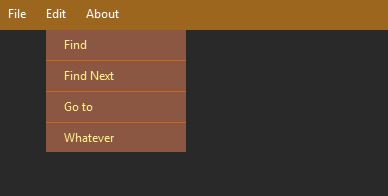
Another example:
| Code: | if fm then fm.Destroy() fm = nil end
fm = createForm()
fm.setSize(400,200)
fm.BorderStyle = 'bsNone'
fm.Position = 'poScreenCenter'
fm.Color = 2697513
fm.Caption = 'My Recipes Book'
fm.OnMouseDown = function() fm.DragNow() end
local fPanel = createPanel(fm)
fPanel.setSize(400,30)
fPanel.setPosition(0,0)
fPanel.BorderStyle = 'bsNone'
fPanel.BevelInner = 'bvRaised'
fPanel.BevelOuter = 'bvRaised'
fPanel.BevelColor = fm.Color
fPanel.Color = 2057884
fPanel.Caption = ""
fPanel.OnMouseDown = function() fm.DragNow() end
menuLabel = {}
menuPanel = {}
for i = 1, 3 do
table.insert(menuLabel, createLabel(fPanel))
menuLabel[i].Top = 6
menuLabel[i].Font.Size = 9
menuLabel[i].Font.Color = 16777215
menuLabel[i].Cursor = -21
table.insert(menuPanel, createPanel(fm))
menuPanel[i].Top = 30
menuPanel[i].Width = 140
menuPanel[i].Color = 1926861
menuPanel[i].BorderStyle = 'bsNone'
menuPanel[i].BevelInner = 'bvLowered'
menuPanel[i].BevelOuter = 'bvLowered'
menuPanel[i].BevelColor = fm.Color
menuPanel[i].Visible = false
end
menuLabel[1].Left = 10
menuLabel[1].Caption = 'File'
menuPanel[1].Left = 0
menuPanel[1].Height = 61
menuLabel[2].Left = menuLabel[1].Left + menuLabel[1].Width + 20
menuLabel[2].Caption = 'Edit'
menuPanel[2].Left = menuLabel[2].Left
menuPanel[2].Height = 122
menuLabel[3].Left = menuLabel[2].Left + menuLabel[2].Width + 20
menuLabel[3].Caption = 'About'
menuPanel[3].Left = menuLabel[3].Left
menuPanel[3].Height = 92
-- Menu 1
subMenu1Item1 = createPanel(menuPanel[1])
subMenu1Item1.Height = 30
subMenu1Item1.Color = 4347787
subMenu1Item1.Font.Color = 9170175
subMenu1Item1.BorderStyle = 'bsNone'
subMenu1Item1.BevelInner = 'bvLowered'
subMenu1Item1.BevelOuter = 'bvLowered'
subMenu1Item1.BevelColor = menuPanel[1].Color
subMenu1Item1.Align = 'alTop'
subMenu1Item1.Alignment = 'taLeft'
subMenu1Item1.Cursor = -21
subMenu1Item1.Caption = ' Open'
subMenu1Item2 = createPanel(menuPanel[1])
subMenu1Item2.Height = 30
subMenu1Item2.Top = 31
subMenu1Item2.Color = 4347787
subMenu1Item2.Font.Color = 9170175
subMenu1Item2.BorderStyle = 'bsNone'
subMenu1Item2.BevelInner = 'bvLowered'
subMenu1Item2.BevelOuter = 'bvLowered'
subMenu1Item2.BevelColor = menuPanel[1].Color
subMenu1Item2.Alignment = 'taLeft'
subMenu1Item2.Cursor = -21
subMenu1Item2.Caption = ' Exit'
--- Menu2
subMenu2Item1 = createPanel(menuPanel[2])
subMenu2Item1.Height = 30
subMenu2Item1.Color = 4347787
subMenu2Item1.Font.Color = 9170175
subMenu2Item1.BorderStyle = 'bsNone'
subMenu2Item1.BevelInner = 'bvLowered'
subMenu2Item1.BevelOuter = 'bvLowered'
subMenu2Item1.BevelColor = menuPanel[2].Color
subMenu2Item1.Align = 'alTop'
subMenu2Item1.Alignment = 'taLeft'
subMenu2Item1.Cursor = -21
subMenu2Item1.Caption = ' Find'
subMenu2Item2 = createPanel(menuPanel[2])
subMenu2Item2.Height = 30
subMenu2Item2.Top = 31
subMenu2Item2.Color = 4347787
subMenu2Item2.Font.Color = 9170175
subMenu2Item2.BorderStyle = 'bsNone'
subMenu2Item2.BevelInner = 'bvLowered'
subMenu2Item2.BevelOuter = 'bvLowered'
subMenu2Item2.BevelColor = menuPanel[2].Color
subMenu2Item2.Alignment = 'taLeft'
subMenu2Item2.Cursor = -21
subMenu2Item2.Caption = ' Find Next'
subMenu2Item3 = createPanel(menuPanel[2])
subMenu2Item3.Height = 30
subMenu2Item3.Top = 62
subMenu2Item3.Color = 4347787
subMenu2Item3.Font.Color = 9170175
subMenu2Item3.BorderStyle = 'bsNone'
subMenu2Item3.BevelInner = 'bvLowered'
subMenu2Item3.BevelOuter = 'bvLowered'
subMenu2Item3.BevelColor = menuPanel[2].Color
subMenu2Item3.Alignment = 'taLeft'
subMenu2Item3.Cursor = -21
subMenu2Item3.Caption = ' Go to'
subMenu2Item4 = createPanel(menuPanel[2])
subMenu2Item4.Height = 30
subMenu2Item4.Top = 93
subMenu2Item4.Color = 4347787
subMenu2Item4.Font.Color = 9170175
subMenu2Item4.BorderStyle = 'bsNone'
subMenu2Item4.BevelInner = 'bvLowered'
subMenu2Item4.BevelOuter = 'bvLowered'
subMenu2Item4.BevelColor = menuPanel[2].Color
subMenu2Item4.Alignment = 'taLeft'
subMenu2Item4.Cursor = -21
subMenu2Item4.Caption = ' Whatever'
--- Menu3
subMenu3Item1 = createPanel(menuPanel[3])
subMenu3Item1.Height = 30
subMenu3Item1.Color = 4347787
subMenu3Item1.Font.Color = 9170175
subMenu3Item1.BorderStyle = 'bsNone'
subMenu3Item1.BevelInner = 'bvLowered'
subMenu3Item1.BevelOuter = 'bvLowered'
subMenu3Item1.BevelColor = menuPanel[3].Color
subMenu3Item1.Align = 'alTop'
subMenu3Item1.Alignment = 'taLeft'
subMenu3Item1.Cursor = -21
subMenu3Item1.Caption = ' About'
subMenu3Item2 = createPanel(menuPanel[3])
subMenu3Item2.Height = 30
subMenu3Item2.Top = 31
subMenu3Item2.Color = 4347787
subMenu3Item2.Font.Color = 9170175
subMenu3Item2.BorderStyle = 'bsNone'
subMenu3Item2.BevelInner = 'bvLowered'
subMenu3Item2.BevelOuter = 'bvLowered'
subMenu3Item2.BevelColor = menuPanel[3].Color
subMenu3Item2.Alignment = 'taLeft'
subMenu3Item2.Cursor = -21
subMenu3Item2.Caption = ' You Tube Channel'
subMenu3Item3 = createPanel(menuPanel[3])
subMenu3Item3.Height = 30
subMenu3Item3.Top = 62
subMenu3Item3.Color = 4347787
subMenu3Item3.Font.Color = 9170175
subMenu3Item3.BorderStyle = 'bsNone'
subMenu3Item3.BevelInner = 'bvLowered'
subMenu3Item3.BevelOuter = 'bvLowered'
subMenu3Item3.BevelColor = menuPanel[3].Color
subMenu3Item3.Alignment = 'taLeft'
subMenu3Item3.Cursor = -21
subMenu3Item3.Caption = ' Facebook page'
function enterMenuItem(sender)
sender.Font.Color = 15570276
end
function leftMenuItem(sender)
sender.Font.Color = 16777215
end
function Menu1_click()
if menuPanel[1].Visible == false then
menuPanel[1].Visible = true
else
menuPanel[1].Visible = false
end
menuPanel[2].Visible = false
menuLabel[2].Font.Color = 16777215
menuLabel[2].Enabled = true
menuPanel[2].Visible = false
menuLabel[3].Font.Color = 16777215
menuLabel[3].Enabled = true
menuPanel[3].Visible = false
end
function Menu2_click()
if menuPanel[2].Visible == false then
menuPanel[2].Visible = true
else
menuPanel[2].Visible = false
end
menuPanel[1].Visible = false
menuLabel[1].Font.Color = 16777215
menuLabel[1].Enabled = true
menuPanel[1].Visible = false
menuLabel[3].Font.Color = 16777215
menuLabel[3].Enabled = true
menuPanel[3].Visible = false
end
function Menu3_click()
if menuPanel[3].Visible == false then
menuPanel[3].Visible = true
else
menuPanel[3].Visible = false
end
menuPanel[1].Visible = false
menuPanel[2].Visible = false
end
function clearance()
closeCE()
return caFree
end
----------------
fm.Show()
for i = 1, 3 do
menuLabel[i].OnMouseEnter = enterMenuItem
menuLabel[i].OnMouseLeave = leftMenuItem
end
menuLabel[1].OnClick = Menu1_click
menuLabel[2].OnClick = Menu2_click
menuLabel[3].OnClick = Menu3_click
subMenu1Item2.OnClick = clearance |
| Description: |
|
| Filesize: |
12.4 KB |
| Viewed: |
3399 Time(s) |
|
_________________
Stealing Code From Stolen Code...
And Admit It.. Hmmm....Typically LOL |
|
| Back to top |
|
|
|
|
You cannot post new topics in this forum
You cannot reply to topics in this forum
You cannot edit your posts in this forum
You cannot delete your posts in this forum
You cannot vote in polls in this forum
You cannot attach files in this forum
You can download files in this forum
|
|
 FAQ
FAQ Search
 Memberlist
 Usergroups
 Register
 Profile
 Log in to check your private messages
 Log in


