 |
Cheat Engine
The Official Site of Cheat Engine
|
| View previous topic :: View next topic |
| Author |
Message |
.lua
Expert Cheater
 Reputation: 1 Reputation: 1
Joined: 13 Sep 2018
Posts: 203
|
 Posted: Wed Jun 05, 2019 11:00 am Post subject: Draw irregular and regular drawings on forms with canvas Posted: Wed Jun 05, 2019 11:00 am Post subject: Draw irregular and regular drawings on forms with canvas |
 |
|
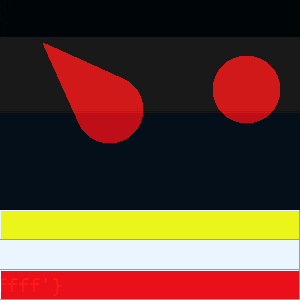
| Code: | if f then f.Destroy() end
f=createForm()
f.font.color=0xffffff
f.BorderStyle='bsNone'
f.Color=0x00
f.setSize(300,300)
f.Position='poDesktopCenter'
color={'0xff','0xffffff','0xffff'}
for k,v in pairs(color) do
p=createPanel(f)
p.Align='alBottom'
p.setSize(30,30)
p.color=v
end
function OnPaint()
local x2,y2=f.ScreenToClient(getMousePos())
local fuzzyvalue=50
for j=fuzzyvalue,1,-3 do
f.Canvas.Pen.Color=j*5
for i=1,f.width/2-j do
f.Canvas.Pen.Width=i-j
f.Canvas.Line(i,i,i,i)
f.Canvas.Line(x2,y2,x2,y2)
end
end
f.Canvas.Clear()
end
f.OnMouseDown=function(sender,button) f.dragNow() OnPaint() end
f.setLayeredAttributes(0xB4,230,3,3) |
Question 1:How can I choose the color of the mouse click?
Question 2:How to draw other images, such as square,rectangle,rounded rectangle, etc.
Question 3:When I click several times in a row, the image looks a little behind the mouse click. What should I do?
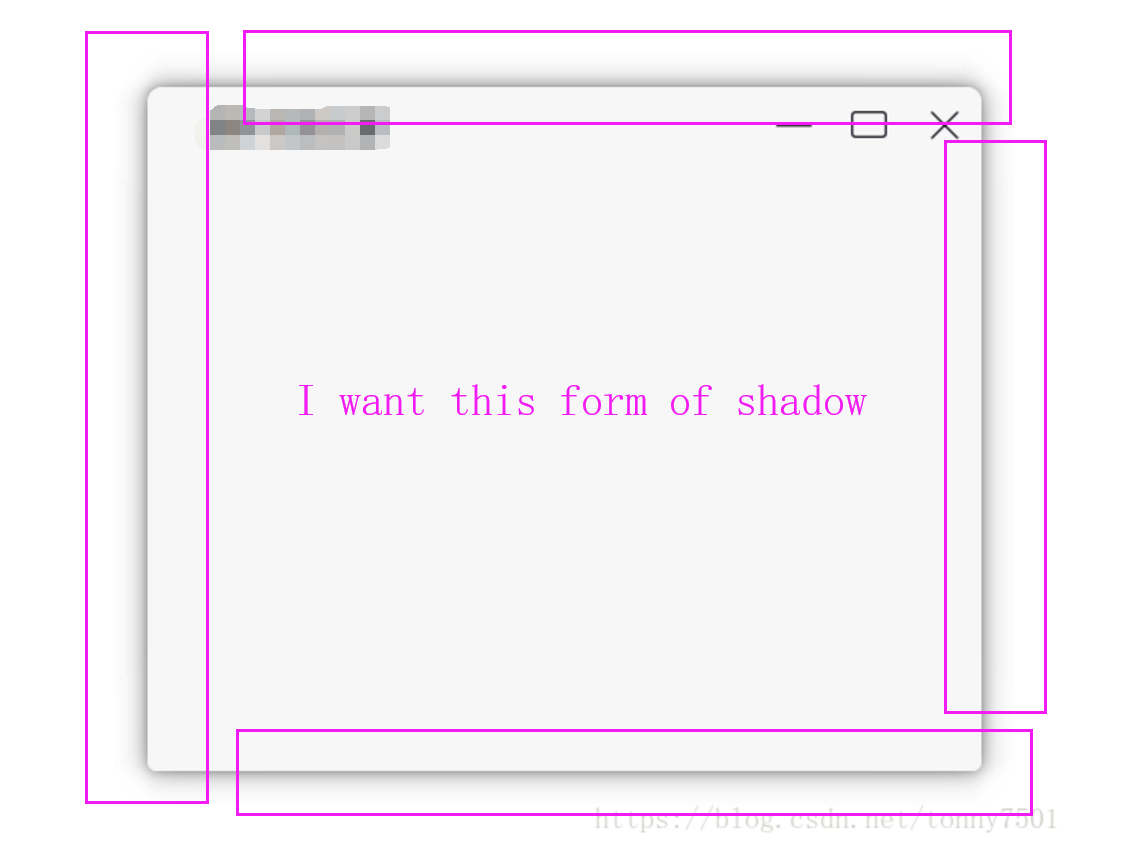
Question 4:This is a problem I've been struggling with, and I hope to be able to achieve borderless form shadows.
| Description: |
|
| Filesize: |
26.14 KB |
| Viewed: |
3136 Time(s) |
|
| Description: |
|
| Filesize: |
2.54 KB |
| Viewed: |
3136 Time(s) |
|
|
|
| Back to top |
|
 |
Dark Byte
Site Admin
 Reputation: 473 Reputation: 473
Joined: 09 May 2003
Posts: 25918
Location: The netherlands
|
| Posted: Wed Jun 05, 2019 12:32 pm Post subject: |
|
|
1: canvas.Pen.Color lets you specify the color
2: canvas class:
| Code: |
rect(x1,y1,x2,y2)
fillRect(x1,y1,x2,y2)
ellipse(x1,y1,x2,y2)
|
no rounded rect yet though
3: You have 4000+ draw operations, so perhaps lower them
Also, you can speed up by decreasing the internal object lookups by putting them outside of the main loop
4: No idea. Tried drawing a border on the window and keep everything else inside there ?
Here's an adjusted piece of code that should be faster:
| Code: |
if f then f.Destroy() end
f=createForm()
f.font.color=0xffffff
f.BorderStyle='bsNone'
f.Color=0x00
f.setSize(300,300)
f.Position='poDesktopCenter'
color={'0xff','0xffffff','0xffff'}
for k,v in pairs(color) do
p=createPanel(f)
p.Align='alBottom'
p.setSize(30,30)
p.color=v
end
function OnPaint(x,y)
local c=0
local x2,y2=x,y
local fuzzyvalue=50
local cp=f.Canvas.Pen
local cnv=f.Canvas
local line=f.Canvas.Line
for j=fuzzyvalue,1,-3 do
cp.Color=0x00ff00+j*5
for i=1,f.width/2-j do
cp.Width=i-j
line(i,i,i,i)
c=c+1
line(x2,y2,x2,y2)
c=c+1
end
end
cnv.Clear()
end
f.OnMouseDown=function(sender,button,x,y) f.dragNow() OnPaint(x,y) end
f.setLayeredAttributes(0xB4,230,3,3)
|
_________________
Tools give you results. Knowledge gives you control.
Like my help? Join me on Patreon so i can keep helping |
|
| Back to top |
|
|
.lua
Expert Cheater
Reputation: 1
Joined: 13 Sep 2018
Posts: 203
|
| Posted: Sun Jun 09, 2019 1:11 am Post subject: |
|
|
| Dark Byte wrote: | 1: canvas.Pen.Color lets you specify the color
2: canvas class:
no rounded rect yet though
3: You have 4000+ draw operations, so perhaps lower them
Also, you can speed up by decreasing the internal object lookups by putting them outside of the main loop
4: No idea. Tried drawing a border on the window and keep everything else inside there ?
Here's an adjusted piece of code that should be faster:
|
Hello, black byte.
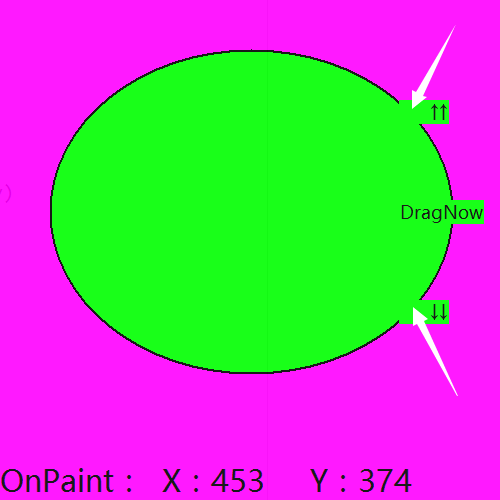
The code you optimized for me is great. Now I have a new question for your help. | Code: | if f then f.Destroy() end
f=createForm()
f.BorderStyle='bsNone'
f.Color=0xff00ff
f.setSize(500,500)
f.Position='poDesktopCenter'
f.FormStyle='fsSystemStayOnTop'
f.tag=0
p=createLabel(f)
p.Align='alBottom'
p.font.size=15
p.caption=string.format('OnPaint: X:%s Y:%s',x,y)
f.setLayeredAttributes(0xB4,230,3,3)
function OnPaint(sender,x,y)
c = sender.Canvas
cp=sender.Canvas.Pen
cp.Color=0x00
text=sender.Canvas.textOut
c.Brush.Color=0xff00
cp.Width=2
sender.repaint() c.clear()
c.ellipse(50,50,x,y)
text(400,100,' ↑↑')
text(400,200,'DragNow')
text(400,300,' ↓↓')
p.caption=string.format('OnPaint: X:%s Y:%s',x,y)
end
OnPaint(f,x,y)
f.OnMouseDown=function(sender,x,y)
f.tag=1
p.caption=string.format('MouePos: X:%s Y:%s',x,y)
if y>=f.Width-100 then f.dragNow() f.tag=0 end
end
f.OnMouseUp=function() f.tag=0 end
f.OnMouseMove=function(sender,x,y) if f.tag==1 then OnPaint(sender,x,y) end end |
Question 1:How to Solve the Scintillation Problem in Painting
Question 2:How to Deal with the Sawtooth Problem of Circular Graph
Question 3:How can I draw many circles in succession
Question 4:Why didn't the original position of the graph follow the mouse when I was drawing?
Question 5:How should I deal with the background of the painting text? I want to make the background of the painting text transparent.
| Description: |
|
| Filesize: |
9.43 KB |
| Viewed: |
3074 Time(s) |
|
|
|
| Back to top |
|
|
|
|
You cannot post new topics in this forum
You cannot reply to topics in this forum
You cannot edit your posts in this forum
You cannot delete your posts in this forum
You cannot vote in polls in this forum
You cannot attach files in this forum
You can download files in this forum
|
|
 FAQ
FAQ Search
 Memberlist
 Usergroups
 Register
 Profile
 Log in to check your private messages
 Log in


