| View previous topic :: View next topic |
| Author |
Message |
LykanthricAura
Advanced Cheater
![]() Reputation: 0 Reputation: 0
Joined: 17 May 2010
Posts: 58
Location: India
|
|
| Back to top |
|
 |
LykanthricAura
Advanced Cheater
![]() Reputation: 0 Reputation: 0
Joined: 17 May 2010
Posts: 58
Location: India
|
 Posted: Fri Feb 14, 2014 11:56 pm Post subject: Posted: Fri Feb 14, 2014 11:56 pm Post subject: |
 |
|
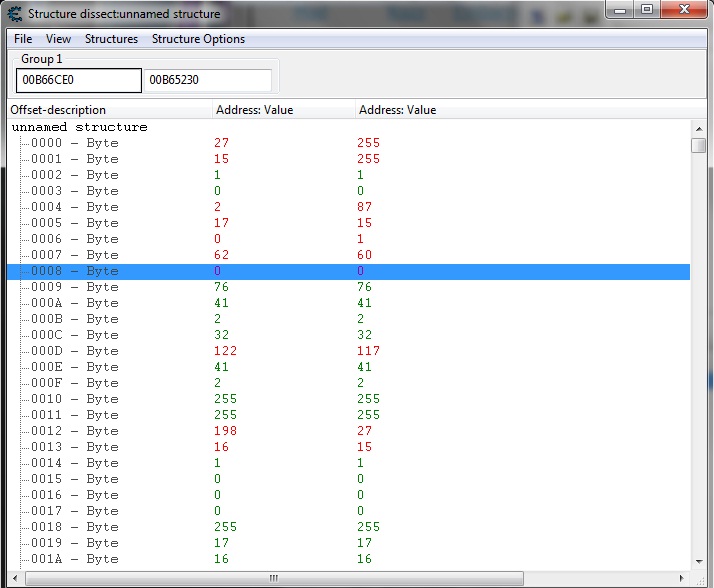
I am able to do this manually. I was just wondering if it can be done automatically...?
| Description: |
|
| Filesize: |
99.77 KB |
| Viewed: |
7933 Time(s) |
|
|
|
| Back to top |
|
|
Dark Byte
Site Admin
 Reputation: 473 Reputation: 473
Joined: 09 May 2003
Posts: 25907
Location: The netherlands
|
| Posted: Sat Feb 15, 2014 1:01 am Post subject: |
|
|
Save this .lua file to the autorun folder of cheat engine (or just execute it manually each time)
It will add a new menu item to the structure dissect window called generator->byte structure
This will create a byte structure and add it to the structures list. You can then select it and use it
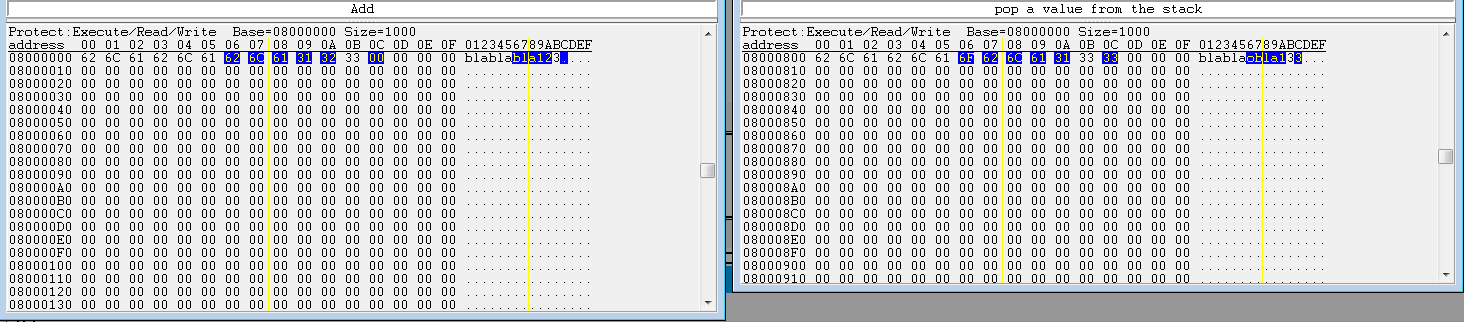
Also, do you know you can compare two memory blocks in the memory viewer and highlight bytes that are different?
Open a second memoryviewer, bring it to the other object in memory, and then rightclick and choose "show difference->between memory browser (x)"
| Description: |
|
| Filesize: |
21.55 KB |
| Viewed: |
7919 Time(s) |
|
| Description: |
|

Download |
| Filename: |
bytestructuregenerator.lua |
| Filesize: |
1.6 KB |
| Downloaded: |
510 Time(s) |
_________________
Do not ask me about online cheats. I don't know any and wont help finding them.
Like my help? Join me on Patreon so i can keep helping |
|
| Back to top |
|
|
LykanthricAura
Advanced Cheater
![]() Reputation: 0 Reputation: 0
Joined: 17 May 2010
Posts: 58
Location: India
|
| Posted: Sat Mar 01, 2014 3:08 am Post subject: |
|
|
| I did not know that. No. Thanks for the tip. And the script.
|
|
| Back to top |
|
|
LykanthricAura
Advanced Cheater
![]() Reputation: 0 Reputation: 0
Joined: 17 May 2010
Posts: 58
Location: India
|
| Posted: Sat Sep 20, 2014 8:14 am Post subject: |
|
|
Which part(s) of the LUA should I change to change the size of each item.
For all the data types.. From byte to Double.
|
|
| Back to top |
|
|
Dark Byte
Site Admin
Reputation: 473
Joined: 09 May 2003
Posts: 25907
Location: The netherlands
|
| Posted: Sat Sep 20, 2014 8:20 am Post subject: |
|
|
Structures and structentries do not have sizes, they just have offsets and an entry with biggest offset value
Anyhow, change the type by changing vtByte to vtWhatever
and you may want to change e.Offset=i to e.Offset=i*entrysize
_________________
Do not ask me about online cheats. I don't know any and wont help finding them.
Like my help? Join me on Patreon so i can keep helping |
|
| Back to top |
|
|
|

 FAQ
FAQ Search
 Memberlist
 Usergroups
 Register
 Profile
 Log in to check your private messages
 Log in