| View previous topic :: View next topic |
| Author |
Message |
Saifallofjmr
Grandmaster Cheater Supreme
![]() Reputation: 4 Reputation: 4
Joined: 02 Apr 2007
Posts: 1450
|
 Posted: Mon Apr 13, 2009 10:46 am Post subject: Posted: Mon Apr 13, 2009 10:46 am Post subject: |
 |
|
Try putting the exe in the C:\program files (x86)\
Folder tree system. It allows 32-bit programs to run in a 64-bit operating system.
-Cheers Saf
_________________
|
|
| Back to top |
|
 |
Weirder Al
Grandmaster Cheater Supreme
 Reputation: 3 Reputation: 3
Joined: 11 Apr 2008
Posts: 1046
|
| Posted: Mon Apr 13, 2009 11:01 am Post subject: |
|
|
Wait, put it into directory C:\Program Files (x86)\ ?
I tried it now, but it still doesn't work...
What's with the phrase "folder tree system"?
Oh wait. The .exe? (Not flash.ocx?) The trainer? Okay, I tried it but, it didn't work... Trying it including the accompanying .dll files...
Didn't work.
|
|
| Back to top |
|
|
Saifallofjmr
Grandmaster Cheater Supreme
![]() Reputation: 4 Reputation: 4
Joined: 02 Apr 2007
Posts: 1450
|
| Posted: Mon Apr 13, 2009 11:03 am Post subject: |
|
|
Google along these lines : using 32-bit programs in a 64 bit
Try some of those solutions.
_________________
|
|
| Back to top |
|
|
Weirder Al
Grandmaster Cheater Supreme
Reputation: 3
Joined: 11 Apr 2008
Posts: 1046
|
| Posted: Mon Apr 13, 2009 6:34 pm Post subject: |
|
|
Can't really find any solutions...So I made "Long List of Trainer Requests 2."
One thing that's kind of annoying now...
So I requested the trainers to be resizable. I always maximize 'em.
Here's what happens with the trainers:
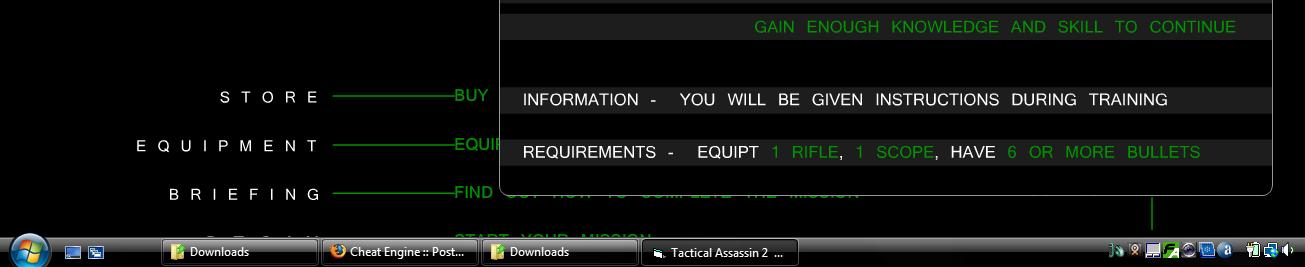
They get cut off. The begin mission button is underneath "Briefing".
I have one trainer already that is NOT cut off that looks like this:

And the guy I'm getting the problematic hidden bottom edges from, well, it works for him!
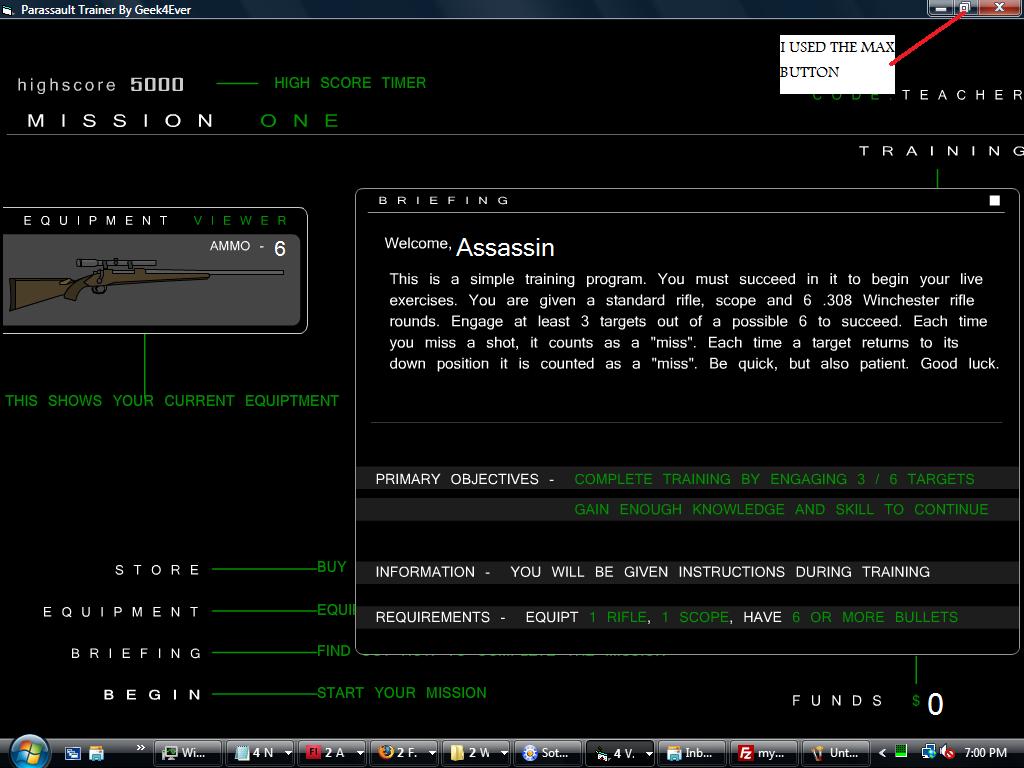
Can I fix that short of not maximizing the trainers??
|
|
| Back to top |
|
|
iTz SWAT
I post too much
 Reputation: 1 Reputation: 1
Joined: 20 Dec 2007
Posts: 2227
Location: Me.Location;
|
|
| Back to top |
|
|
Weirder Al
Grandmaster Cheater Supreme
Reputation: 3
Joined: 11 Apr 2008
Posts: 1046
|
| Posted: Mon Apr 13, 2009 8:43 pm Post subject: |
|
|
The one on top is incompatible with Vista, and the one on the bottom...Downloaded it, and it says that to start, you press Alt + CTRL + F12. This is the combo to open the Intel Graphics Media Accelerator control window.
|
|
| Back to top |
|
|
iTz SWAT
I post too much
Reputation: 1
Joined: 20 Dec 2007
Posts: 2227
Location: Me.Location;
|
| Posted: Mon Apr 13, 2009 9:21 pm Post subject: |
|
|
Use the tool attached...
USAGE
===============
Changing current window size:
Win + Ctrl + Arrows : Resize window.
Win + Ctrl + Shift + Arrows : Resize window (fine).
Last edited by iTz SWAT on Mon Apr 13, 2009 9:58 pm; edited 2 times in total |
|
| Back to top |
|
|
hcavolsdsadgadsg
I'm a spammer
![]() Reputation: 26 Reputation: 26
Joined: 11 Jun 2007
Posts: 5801
|
| Posted: Mon Apr 13, 2009 9:45 pm Post subject: |
|
|
| saf wrote: | Try putting the exe in the C:\program files (x86)\
Folder tree system. It allows 32-bit programs to run in a 64-bit operating system.
-Cheers Saf |
no, windows-on-windows is what does this.
|
|
| Back to top |
|
|
Weirder Al
Grandmaster Cheater Supreme
Reputation: 3
Joined: 11 Apr 2008
Posts: 1046
|
| Posted: Tue Apr 14, 2009 5:04 am Post subject: |
|
|
| iTz SWAT wrote: | Use the tool attached...
USAGE
===============
Changing current window size:
Win + Ctrl + Arrows : Resize window.
Win + Ctrl + Shift + Arrows : Resize window (fine). |
Wait, WTF is the "Win" button??
|
|
| Back to top |
|
|
iTz SWAT
I post too much
Reputation: 1
Joined: 20 Dec 2007
Posts: 2227
Location: Me.Location;
|
| Posted: Tue Apr 14, 2009 5:45 am Post subject: |
|
|
The Win button is the button Left of Alt and Right of Ctrl,...

|
|
| Back to top |
|
|
Karakawe
I post too much
 Reputation: 3 Reputation: 3
Joined: 17 Apr 2007
Posts: 3899
|
| Posted: Tue Apr 14, 2009 3:32 pm Post subject: |
|
|
Over here in Linux world it's the Super key. 
|
|
| Back to top |
|
|
Weirder Al
Grandmaster Cheater Supreme
Reputation: 3
Joined: 11 Apr 2008
Posts: 1046
|
| Posted: Tue Apr 14, 2009 3:35 pm Post subject: |
|
|
Lol, I thought that was called the Windows button...At any rate, to the right of my control button is the Function button lol.
The thing works...But is there ANY way to just make it so the bottom portion of the trainer isn't covered when I maximize the window? I'd really like to keep it as simple as maximizing... 
|
|
| Back to top |
|
|
iTz SWAT
I post too much
Reputation: 1
Joined: 20 Dec 2007
Posts: 2227
Location: Me.Location;
|
| Posted: Tue Apr 14, 2009 6:47 pm Post subject: |
|
|
If the Trainer is maximized, and you can change it's size then yes...
If you can't change the size during maximize, then sorry nop, your going to have to odify the resolution using the program I gave you...
|
|
| Back to top |
|
|
|

 FAQ
FAQ Search
 Memberlist
 Usergroups
 Register
 Profile
 Log in to check your private messages
 Log in




