 |
Cheat Engine
The Official Site of Cheat Engine
|
| View previous topic :: View next topic |
| Author |
Message |
Corroder
Grandmaster Cheater Supreme
 Reputation: 75 Reputation: 75
Joined: 10 Apr 2015
Posts: 1668
|
 Posted: Fri Jul 10, 2020 4:47 am Post subject: Can CE Lua print to paper? Posted: Fri Jul 10, 2020 4:47 am Post subject: Can CE Lua print to paper? |
 |
|
As the subject
_________________
Stealing Code From Stolen Code...
And Admit It.. Hmmm....Typically LOL |
|
| Back to top |
|
 |
Dark Byte
Site Admin
 Reputation: 473 Reputation: 473
Joined: 09 May 2003
Posts: 25916
Location: The netherlands
|
| Posted: Fri Jul 10, 2020 6:01 am Post subject: |
|
|
Nope, not right now (Also not environmentally friendly lol)
but what do you need it for ? Print out ce lua script, or use ce's lua to print stuff ?
_________________
Tools give you results. Knowledge gives you control.
Like my help? Join me on Patreon so i can keep helping |
|
| Back to top |
|
|
Corroder
Grandmaster Cheater Supreme
Reputation: 75
Joined: 10 Apr 2015
Posts: 1668
|
| Posted: Fri Jul 10, 2020 7:20 am Post subject: |
|
|
I need to print out some result from some variables and tables.
Example:
| Code: | player_table = {
{v_name = 'John", v_hp = 1000, v_spell = 500, v_country = "Sky Kingdom", v_image = "john.jpg"},
{v_name = 'Watanabe", v_hp = 1500, v_spell = 500, v_country = "Sea Kingdom", v_image = "watanabe.jpg"}
}
function GetplayersInfo()
idx = playerCB.ItemIndex --- a comboBox
if idx <= 0 then return nil end
showPlayerPanel() --- show player panel on screen
pSearchPlayerBox.Text = player_table[idx].v_name
pHpBox.Text = player_table[idx].v_hp
pSpellBox.Text = player_table[idx].v_spell
pCountryBox.Text = player_table[idx].v_country
pImageBox.Text = tab_recipe[idx].v_image
btnPrintPlayerInfo.Enabled = true
end
function printPlayer()
test = [[
--- here to print the player info output to printer eq:
plyrInfo = [[
................ Player Info ..................
-----------------------------------------
Player name = ]]..pSearchPlayerBox.Text
[[Total HP = ]]..pHpBox.Text
[[Total Spell = ]]..pSpellBox.Text
[[Country = ]].. pCountryBox.Text
]]
-- mean while I am use
plyrInfoFile = io.open(pSearchPlayerBox.Text..".txt"', "W')
plyrInfoFile:write(plyrInfo)
plyrInfoFile:close()
end
playerCB.OnChange = GetplayersInfo
btnPrintPlayerInfo.OnClick = printPlayer |
I think there are a Lua module to print string to a PDF file also and this one below just print Lua Engine result to console.
| Code: | local out = io.popen('find /v "" > con', "w")
function print(s)
out:write(s.."\r\n") --\r because windows
out:flush()
end
print("It really works this time!")
|
_________________
Stealing Code From Stolen Code...
And Admit It.. Hmmm....Typically LOL |
|
| Back to top |
|
|
atom0s
Moderator
 Reputation: 205 Reputation: 205
Joined: 25 Jan 2006
Posts: 8585
Location: 127.0.0.1
|
| Posted: Fri Jul 10, 2020 1:59 pm Post subject: |
|
|
There are command line tools like Windows 'print' that can be used to send things to the default printer. Combine that with Lua's normal file I/O and you should be able to achieve this via os.execute.
_________________
- Retired. |
|
| Back to top |
|
|
Corroder
Grandmaster Cheater Supreme
Reputation: 75
Joined: 10 Apr 2015
Posts: 1668
|
| Posted: Sat Jul 11, 2020 1:11 am Post subject: |
|
|
Yes atom0s, I can use something like:
| Code: | cmd = [[print c:\file.txt /c /d:lpt1]] -- or use other print arguments
os.execute(cmd)
|
But, the windows print command arguments only allow printer port COM and LPT, beside shall not show printer options.
So, I decide make a simple HTML page with print option on it, example:
| Code: | p_name = " >>> Corroder The Cheater Slayer <<<"
p_decs = 'A man with golden gun with infinity ammo'
p_cat = 'Hero'
p_country = 'The Sky Kingdom'
p_gen = 'Male'
p_items = [[
500 HP <br>
1000 FP<br>
250 Spell Items<br>
2 Golden Guns<br>
1 Sharp Golden Magic Sword<br>
1 Bow Arrow<br>
2 Knives<br>
Re-custom uniform<br>
]]
p_abi = [[
1. Able to flying for 3- seconds<br>
2. Give 200 damage points<br>
3. Move slow<br>
4. Eat too much<br>
]]
scr = [[
<!DOCTYPE html>
<html>
<body>
<div style="width:600px; height:620px; padding:15px; text-align:left; border: 10px solid #787878; background-color:DarkSlateGray">
<div style="width:560px; height:580px; padding:15px; text-align:left; border: 5px solid #787878; background-color:FloralWhite">
<h1 style="color:blue;">Player Card</h1>
<h2 style="color:green;">]]..p_name..[[</h2>
<p1>Description : ]]..p_decs..[[</p1>
<br>
<p1>Category : ]]..p_cat..[[</p1>
<br>
<p1>Country of Origin : ]]..p_country..[[</p1>
<br>
<p1>Gender : ]]..p_gen..[[</p1>
<br>
<h3 style="color:Brown;">Items Collection</h3>
<p1>]]..p_items..[[</p1>
<h3 style="color:Brown;">Abilities</h3>
<p1>]]..p_abi..[[</p1>
<br>
<span style="font-size:15px"><i>Perform by : Corroder - Hero Card</span>
</div>
</div>
</body>
</html>
<input type="button" value="Print this page" onClick="window.print()">
]]
local function show_html(htmlscript)
local encoder_table = {}
for _, chars in ipairs{'==', 'AZ', 'az', '09', '++', '//'} do
for ascii = chars:byte(), chars:byte(2) do
table.insert(encoder_table, string.char(ascii))
end
end
local function tobase64(str)
local result, pos = {}, 1
while pos <= #str do
local last3 = {str:byte(pos, pos+2)}
local padded = 3 - #last3
for j = 1, padded do
table.insert(last3, 0)
end
local codes = {
math.floor(last3[1] / 4),
last3[1] % 4 * 16 + math.floor(last3[2] / 16),
last3[2] % 16 * 4 + math.floor(last3[3] / 64),
last3[3] % 64
}
for j = 1, 4 do
codes[j] = encoder_table[j+padded > 4 and 1 or 2+codes[j]]
end
pos = pos + 3
table.insert(result, table.concat(codes))
end
return table.concat(result)
end
os.execute([[start "" "C:\Program Files\Mozilla Firefox\firefox.exe" ]]
..'"data:text/html;charset=utf-8;base64,'..tobase64(htmlscript)..'"')
end
show_html(scr)
|
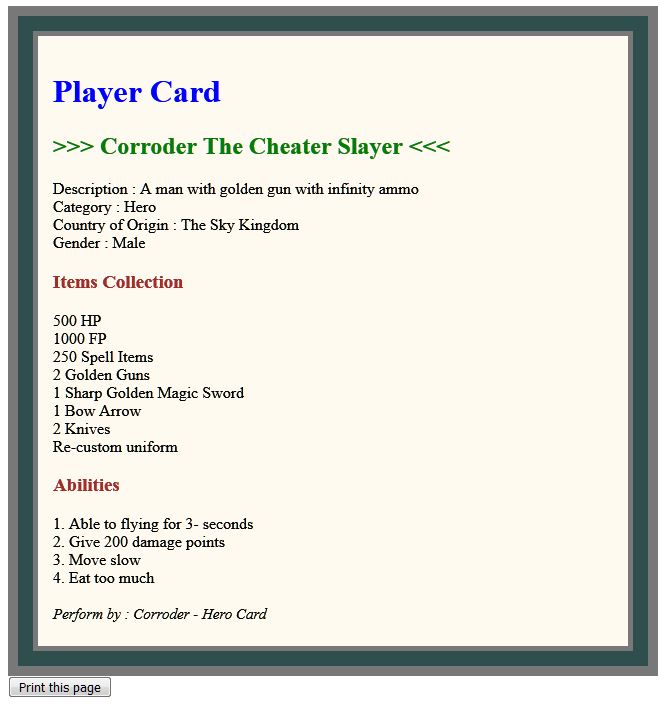
Meanwhile, for who want to test, the script above on Firefox browser, not test on IE, Chrome or other browsers.
The result as attached picture.
| Description: |
|
| Filesize: |
61.21 KB |
| Viewed: |
3554 Time(s) |
|
_________________
Stealing Code From Stolen Code...
And Admit It.. Hmmm....Typically LOL |
|
| Back to top |
|
|
atom0s
Moderator
Reputation: 205
Joined: 25 Jan 2006
Posts: 8585
Location: 127.0.0.1
|
| Posted: Sat Jul 11, 2020 1:29 am Post subject: |
|
|
| Quote: | But, the windows print command arguments only allow printer port COM and LPT, beside shall not show printer options.
|
You can print to network-attached printers as well via the print command line.
You can also force the DOS print command to use the Windows spooler with some extra steps such as:
https://smallbusiness.chron.com/force-dos-print-output-through-windows-spooler-49689.html
You can also create your own app to handle the printing yourself, such as a windowless browser that you feed it a path to load and it will automatically print after the load event has finished. (You can do this rather easily in a language like C# with the built-in browser control of the system.)
There are also tons of other command line based printer applications you can use to do this with any kind of printer, or even to convert to PDF or print using the XPS driver.
_________________
- Retired. |
|
| Back to top |
|
|
Corroder
Grandmaster Cheater Supreme
Reputation: 75
Joined: 10 Apr 2015
Posts: 1668
|
| Posted: Sat Jul 11, 2020 4:44 am Post subject: |
|
|
| atom0s wrote: | | You can also create your own app to handle the printing yourself, ..... (You can do this rather easily in a language like C# with the built-in browser control of the system.) |
Thanks for information, yes I can do make a printer handler using C#. Still in progress to make it work properly by some references.
_________________
Stealing Code From Stolen Code...
And Admit It.. Hmmm....Typically LOL |
|
| Back to top |
|
|
Corroder
Grandmaster Cheater Supreme
Reputation: 75
Joined: 10 Apr 2015
Posts: 1668
|
| Posted: Sun Jul 12, 2020 5:03 am Post subject: |
|
|
Tried:
#1: from linux syntax to access printer, pipe to port and give commands instruction
| Code: | out = assert(io.popen("XPSPort","wb"))
-- or out = assert(io.popen("COM4","wb")) , etc
out:write("Hello\n")
out:close()
|
#2: using power shell script to identifying serial port and baut rate (from stack overflow site)
--writeThenReadCOMinLua.lua
| Code: | local comPort = "COM2"
local baud = "9600"
local dataToWrite = "Hello. Is Anyone There?"
--run the powershell script with supplied params. Spaces are important.
local file = io.popen("powershell.exe -file ./liblocal/psLibs/writeAndReadCOM.ps1
"..comPort.. " " .. baud .. " " .. dataToWrite)
--Wait for a reply (indefinitely)
local rslt = file:read("*a")
print("Response: " .. rslt)
|
---writeAndReadCOM.ps1
| Code: | $nargs = $args.Count #args is the list of input arguments
$comPortName=$args[0] #This is the com port. It has zero spaces
$baud = $args[1] #this is the numberical baud rate
#the remainder of the arguments are processed below
#Combine argument 2,3,...,n with a space because of command prompt shortfalls to pass arguments with spaces
$dataToWrite = ""
For ($i=2; $i -le $nargs ; $i++) {
$dataToWrite = "$($dataToWrite) $($args[$i])"
}
#$port= new-Object System.IO.Ports.SerialPort COM2,9600,None,8,one
$port= new-Object System.IO.Ports.SerialPort $comPortName,$baud,None,8,one
#open port if it's not yet open
IF ($port.IsOpen) {
#already open
} ELSE {
#open port
$port.Open()
}
#write the data
$port.WriteLine($dataToWrite)
#wait for a response (must end in newline). This removes the need to have a hard coded delay
$line = $port.ReadLine()
Write-Host $line #send read data out
#if the response was multiple lines, then read the rest of the buffer. If the port was just opened.
while ($port.BytesToRead -ne 0) {
$dataReturned = 1
$line = $port.ReadLine()
Write-Host $line #send read data out for the remainder of the buffer
}
$port.Close()
#IF ($dataReturned -eq 0) {'PS_NO_BYTES_TO_READ'}
|
#3: print to PDF file
see: https://github.com/catseye/pdf.lua
This is for Lua 5.1 but is easy to porting to Lua 5.3 by change:
to
_________________
Stealing Code From Stolen Code...
And Admit It.. Hmmm....Typically LOL |
|
| Back to top |
|
|
|
|
You cannot post new topics in this forum
You cannot reply to topics in this forum
You cannot edit your posts in this forum
You cannot delete your posts in this forum
You cannot vote in polls in this forum
You cannot attach files in this forum
You can download files in this forum
|
|
 FAQ
FAQ Search
 Memberlist
 Usergroups
 Register
 Profile
 Log in to check your private messages
 Log in


