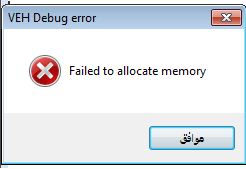
| View previous topic :: View next topic |
| Author |
Message |
alhjri
How do I cheat?
![]() Reputation: 0 Reputation: 0
Joined: 20 Jun 2014
Posts: 6
|
 Posted: Fri Jun 20, 2014 11:47 am Post subject: I can't change the values! in CE Posted: Fri Jun 20, 2014 11:47 am Post subject: I can't change the values! in CE |
 |
|
hi there,
as the title... when I want to change values in some processes with Cheat Engines , it does not change at all .
I think that the process which I want to edit, is protected or something
I can't even run the debugger for it
I will appreciate your help 
|
|
| Back to top |
|
 |
cashd
Cheater
![]() Reputation: 0 Reputation: 0
Joined: 25 Nov 2012
Posts: 25
|
| Posted: Fri Jun 20, 2014 12:08 pm Post subject: |
|
|
maybe you attach cheat engine to the wrong process?
what message you get when you try open debugger?
and the title of that msgbox is Themida in any chance?
|
|
| Back to top |
|
|
NanoByte
Expert Cheater
![]() Reputation: 1 Reputation: 1
Joined: 13 Sep 2013
Posts: 222
|
| Posted: Fri Jun 20, 2014 12:08 pm Post subject: |
|
|
| if its online game then forget it. else you might have found the display value
|
|
| Back to top |
|
|
alhjri
How do I cheat?
![]() Reputation: 0 Reputation: 0
Joined: 20 Jun 2014
Posts: 6
|
| Posted: Fri Jun 20, 2014 1:03 pm Post subject: |
|
|
| NanoByte wrote: | | if its online game then forget it. else you might have found the display value |
no it's offline game,
I can play it offline
| cashd wrote: | maybe you attach cheat engine to the wrong process?
what message you get when you try open debugger?
and the title of that msgbox is Themida in any chance? |
I know how to use it, I have hacked so many games ,but I faced this problem
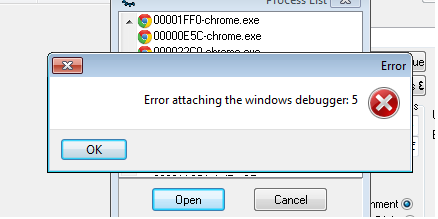
I get this message when try to debug:
| Description: |
|
| Filesize: |
10.98 KB |
| Viewed: |
30696 Time(s) |
|
|
|
| Back to top |
|
|
Redouane
Master Cheater
![]() Reputation: 3 Reputation: 3
Joined: 05 Sep 2013
Posts: 363
Location: Algeria
|
| Posted: Fri Jun 20, 2014 1:53 pm Post subject: |
|
|
| alhjri wrote: | | NanoByte wrote: | | if its online game then forget it. else you might have found the display value |
no it's offline game,
I can play it offline
| cashd wrote: | maybe you attach cheat engine to the wrong process?
what message you get when you try open debugger?
and the title of that msgbox is Themida in any chance? |
I know how to use it, I have hacked so many games ,but I faced this problem
I get this message when try to debug: |
Go to settings/Debugger options and enable the use of the VEH debugger (in the debugger method).
Hope this helps.
|
|
| Back to top |
|
|
alhjri
How do I cheat?
![]() Reputation: 0 Reputation: 0
Joined: 20 Jun 2014
Posts: 6
|
|
| Back to top |
|
|
NanoByte
Expert Cheater
![]() Reputation: 1 Reputation: 1
Joined: 13 Sep 2013
Posts: 222
|
| Posted: Sat Jun 21, 2014 8:11 am Post subject: |
|
|
| try restarting computer
|
|
| Back to top |
|
|
alhjri
How do I cheat?
![]() Reputation: 0 Reputation: 0
Joined: 20 Jun 2014
Posts: 6
|
| Posted: Sun Jun 22, 2014 6:27 am Post subject: |
|
|
| NanoByte wrote: | | try restarting computer |
now I found that the process is protected, it's read only in memory!
how do I make it writable ?
|
|
| Back to top |
|
|
Redouane
Master Cheater
![]() Reputation: 3 Reputation: 3
Joined: 05 Sep 2013
Posts: 363
Location: Algeria
|
| Posted: Sun Jun 22, 2014 6:56 am Post subject: |
|
|
| alhjri wrote: | | NanoByte wrote: | | try restarting computer |
now I found that the process is protected, it's read only in memory!
how do I make it writable ? |
Try this:
open the memory viewer,click ctrl+A,then tyoe 'fullaccess(address,size)' where address is the address where your block starts,and size is the size of your block.
Otherwise,you could maybe create a thread and call VirtualProtect from inside the process,of course passing the correct arguments.
|
|
| Back to top |
|
|
alhjri
How do I cheat?
![]() Reputation: 0 Reputation: 0
Joined: 20 Jun 2014
Posts: 6
|
| Posted: Sun Jun 22, 2014 10:06 am Post subject: |
|
|
| Redone wrote: | Try this:
open the memory viewer,click ctrl+A,then tyoe 'fullaccess(address,size)' where address is the address where your block starts,and size is the size of your block.
Otherwise,you could maybe create a thread and call VirtualProtect from inside the process,of course passing the correct arguments. |
I really didn't understand anything
im alittle noob
I just want to change it from (read only) to (read & write)
can you explain easier? 
|
|
| Back to top |
|
|
Rissorr
Master Cheater
![]() Reputation: 3 Reputation: 3
Joined: 17 Sep 2013
Posts: 273
Location: Israel!
|
| Posted: Sun Jun 22, 2014 10:17 am Post subject: |
|
|
Maybe use the Kernel Debugger (Settings->Debugger Options->Use kernelmode Debugger (Requires DBVM)
also try Read/write process memory ( in the Settings->Extra )
|
|
| Back to top |
|
|
Redouane
Master Cheater
![]() Reputation: 3 Reputation: 3
Joined: 05 Sep 2013
Posts: 363
Location: Algeria
|
| Posted: Sun Jun 22, 2014 10:54 am Post subject: |
|
|
| alhjri wrote: | | Redone wrote: | Try this:
open the memory viewer,click ctrl+A,then tyoe 'fullaccess(address,size)' where address is the address where your block starts,and size is the size of your block.
Otherwise,you could maybe create a thread and call VirtualProtect from inside the process,of course passing the correct arguments. |
I really didn't understand anything
im alittle noob
I just want to change it from (read only) to (read & write)
can you explain easier? |
The first one is simple,open the memory viewer by clicking 'memory view' in the main cheat engine window,then press CTRL+A,then type this:
| Code: | | fullaccess(address,size) |
remplace the word address with the address where you want to set the 'write' flag,and size to something like 2048 (or 4096).
The 2nd approach requires some Windows API calling mechanisms knowledge,you can learn by reading the CE help file (or olly dbg's one),and of course reading about that particular function in MSDN.
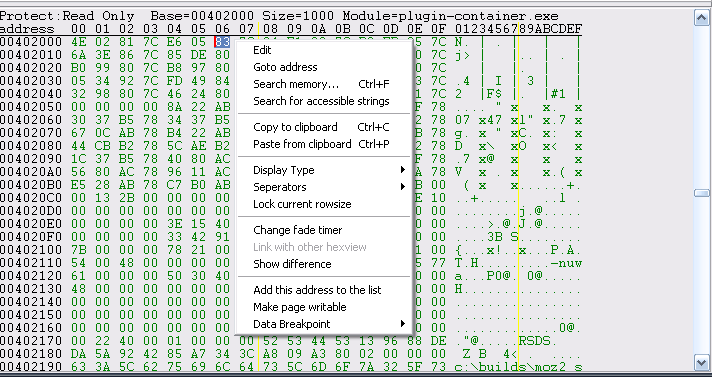
You could also click on 'make page writable' in the dump section,goto your address first.
| Description: |
|
| Filesize: |
15.29 KB |
| Viewed: |
30552 Time(s) |
|
|
|
| Back to top |
|
|
alhjri
How do I cheat?
![]() Reputation: 0 Reputation: 0
Joined: 20 Jun 2014
Posts: 6
|
| Posted: Sun Jun 22, 2014 2:10 pm Post subject: |
|
|
| mixmax35 wrote: | Maybe use the Kernel Debugger (Settings->Debugger Options->Use kernelmode Debugger (Requires DBVM)
also try Read/write process memory ( in the Settings->Extra ) |
thank you so much buddy, it worked!
| Redone wrote: | | alhjri wrote: | | Redone wrote: | Try this:
open the memory viewer,click ctrl+A,then tyoe 'fullaccess(address,size)' where address is the address where your block starts,and size is the size of your block.
Otherwise,you could maybe create a thread and call VirtualProtect from inside the process,of course passing the correct arguments. |
I really didn't understand anything
im alittle noob
I just want to change it from (read only) to (read & write)
can you explain easier? |
The first one is simple,open the memory viewer by clicking 'memory view' in the main cheat engine window,then press CTRL+A,then type this:
| Code: | | fullaccess(address,size) |
remplace the word address with the address where you want to set the 'write' flag,and size to something like 2048 (or 4096).
The 2nd approach requires some Windows API calling mechanisms knowledge,you can learn by reading the CE help file (or olly dbg's one),and of course reading about that particular function in MSDN.
You could also click on 'make page writable' in the dump section,goto your address first. |
thank you guys thank you very much, I appreciate your help! 
|
|
| Back to top |
|
|
Rissorr
Master Cheater
![]() Reputation: 3 Reputation: 3
Joined: 17 Sep 2013
Posts: 273
Location: Israel!
|
| Posted: Sun Jun 22, 2014 6:01 pm Post subject: |
|
|
| Glad to help ^_^
|
|
| Back to top |
|
|
|

 FAQ
FAQ Search
 Memberlist
 Usergroups
 Register
 Profile
 Log in to check your private messages
 Log in