| View previous topic :: View next topic |
| Author |
Message |
Mastermates
Newbie cheater
![]() Reputation: 0 Reputation: 0
Joined: 15 Jan 2012
Posts: 11
|
 Posted: Fri Apr 20, 2012 9:59 am Post subject: Problem. Posted: Fri Apr 20, 2012 9:59 am Post subject: Problem. |
 |
|
Hello
I have a problem with CE (6.1). I am trying to use it on a game (which I used CE on, before).
I run the game, I start CE 6.1 and I select the process (window list). After I double click the process I receive the error "Error while opening this process".
I have to mention few things:
- I used the same version of CE before;
- a friend of mine is using the same version which is annoying me right now..
- I noticed that when it worked, the process was like 00000384 - GAMENAME and now is 00000000 - GAMENAME .
- I am using win 7 ultimate 64 bit - so it's not because of the version, my friend is using the same.
- my firewall is OFF
- my anti-virus is DISABLED
- I tried with that "kernel thing" from edit-> settings -> extra (I rebooted as it said , I pressed F8 and enabled what it asked for, after I done that, that error was fixed but it was the same 0000000-GAMENAME and when I tried to search for an address it took just too long and I stopped it, this thing never happened before, it was taking maximum 3-4 secs/scan, and I am scanning now for the same values)
- I ran it with administrator rights, both GAME and CE.
I am asking for help after I have tried everything which came to my mind.
Please come with a solution  . .
|
|
| Back to top |
|
 |
igor
Expert Cheater
![]() Reputation: 1 Reputation: 1
Joined: 04 Apr 2012
Posts: 145
|
| Posted: Fri Apr 20, 2012 10:10 am Post subject: |
|
|
Try this Settings and try opening process from menu bar.
| Description: |
|
| Filesize: |
7.37 KB |
| Viewed: |
13728 Time(s) |

|
|
|
| Back to top |
|
|
Mastermates
Newbie cheater
![]() Reputation: 0 Reputation: 0
Joined: 15 Jan 2012
Posts: 11
|
| Posted: Fri Apr 20, 2012 10:22 am Post subject: |
|
|
| It is not working. It's the same (GAME - 00000000)
|
|
| Back to top |
|
|
Dark Byte
Site Admin
 Reputation: 472 Reputation: 472
Joined: 09 May 2003
Posts: 25872
Location: The netherlands
|
| Posted: Fri Apr 20, 2012 10:25 am Post subject: |
|
|
Launch the processwatcher before opening the game
Then use the processwatcher window to open it
_________________
Do not ask me about online cheats. I don't know any and wont help finding them.
Like my help? Join me on Patreon so i can keep helping |
|
| Back to top |
|
|
Mastermates
Newbie cheater
![]() Reputation: 0 Reputation: 0
Joined: 15 Jan 2012
Posts: 11
|
| Posted: Fri Apr 20, 2012 11:08 am Post subject: |
|
|
So the "process watcher" would be Task Manager.
But I do not know how to start CE via Task Manager.
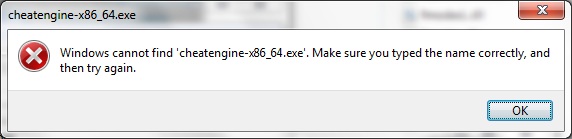
edit: I did it with the browse thing (I opened CE via Task Manager) but it is still the same.
I think I know why. I reinstalled my windows and I left the game on disk D (it doesn't appear on uninstall/remove programs)
I will try now.
| Description: |
|
| Filesize: |
24.38 KB |
| Viewed: |
13695 Time(s) |
|
Last edited by Mastermates on Fri Apr 20, 2012 11:27 am; edited 1 time in total |
|
| Back to top |
|
|
igor
Expert Cheater
![]() Reputation: 1 Reputation: 1
Joined: 04 Apr 2012
Posts: 145
|
| Posted: Fri Apr 20, 2012 11:25 am Post subject: |
|
|
| Mastermates wrote: | So the "process watcher" would be Task Manager.
But I do not know how to start CE via Task Manager.
edit: I did it with the browse thing (I opened CE via Task Manager) but it is still the same. |
No Process Watcher is not the task manager.
Follow Steps.
-Don't open Game
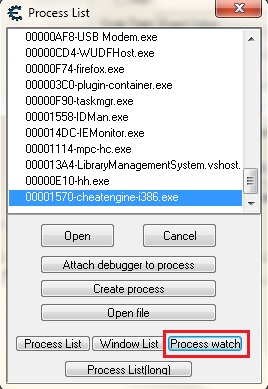
-Open ProcessList, you should see Process Watch Button(see Image).
-Process watcher window open with empty list
-Now open Game. and the game name is listed in the process watcher list.
-Now open that from the process watcher window.
| Description: |
|
| Filesize: |
47.15 KB |
| Viewed: |
13683 Time(s) |
|
|
|
| Back to top |
|
|
Mastermates
Newbie cheater
![]() Reputation: 0 Reputation: 0
Joined: 15 Jan 2012
Posts: 11
|
| Posted: Fri Apr 20, 2012 11:28 am Post subject: |
|
|
I do not have process watch button.
I am reinstalling the game atm, I hope it will work.
edit: I have no process watch button and it doesn't work even with the game re-installed.
What do I do now?
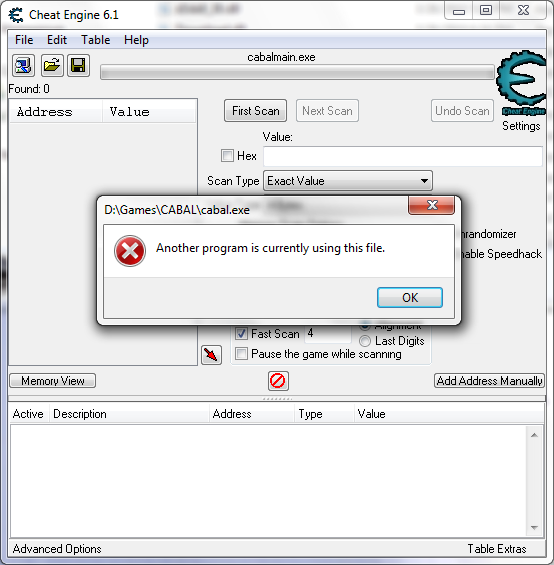
If I try with "open file button" and I select the game executable (see the pic)
| Description: |
|
| Filesize: |
67.76 KB |
| Viewed: |
13661 Time(s) |
|
|
|
| Back to top |
|
|
igor
Expert Cheater
![]() Reputation: 1 Reputation: 1
Joined: 04 Apr 2012
Posts: 145
|
| Posted: Fri Apr 20, 2012 11:44 am Post subject: |
|
|
| Mastermates wrote: | I do not have process watch button.
I am reinstalling the game atm, I hope it will work.
edit: I have no process watch button and it doesn't work even with the game re-installed.
What do I do now? |
You should try re-installing Cheat Engine not the game.
|
|
| Back to top |
|
|
Mastermates
Newbie cheater
![]() Reputation: 0 Reputation: 0
Joined: 15 Jan 2012
Posts: 11
|
| Posted: Fri Apr 20, 2012 11:45 am Post subject: |
|
|
| I did that too. And I am doing it again right now.
|
|
| Back to top |
|
|
igor
Expert Cheater
![]() Reputation: 1 Reputation: 1
Joined: 04 Apr 2012
Posts: 145
|
| Posted: Fri Apr 20, 2012 11:52 am Post subject: |
|
|
use the software called 'unlocker' its freeware it is ~1mb.
It is used for check which process is using the file.
Try opening 'cabal.exe' in unlocker and find out which process is using this file.
|
|
| Back to top |
|
|
Mastermates
Newbie cheater
![]() Reputation: 0 Reputation: 0
Joined: 15 Jan 2012
Posts: 11
|
| Posted: Fri Apr 20, 2012 12:19 pm Post subject: |
|
|
| I thought it's obviously that CE is using the file (game). I went to "Open file" in CE, then I tried to run the game, and the error appeared.
|
|
| Back to top |
|
|
igor
Expert Cheater
![]() Reputation: 1 Reputation: 1
Joined: 04 Apr 2012
Posts: 145
|
| Posted: Fri Apr 20, 2012 12:31 pm Post subject: |
|
|
| Mastermates wrote: | | I thought it's obviously that CE is using the file (game). I went to "Open file" in CE, then I tried to run the game, and the error appeared. |
Would you tried to find using 'unlocker', which process is exactly using this file?
|
|
| Back to top |
|
|
Dark Byte
Site Admin
Reputation: 472
Joined: 09 May 2003
Posts: 25872
Location: The netherlands
|
| Posted: Fri Apr 20, 2012 1:12 pm Post subject: |
|
|
if you go to settngs->extra you can enable the use of the processwatcher
also, reinstall the game, by using open file you have most likely caused a change to the file
And does the taskmanager do show a valid processid?
If so, rightclick the processlist, convert the processid from integer to hexadecimal, and fill that in
_________________
Do not ask me about online cheats. I don't know any and wont help finding them.
Like my help? Join me on Patreon so i can keep helping |
|
| Back to top |
|
|
Mastermates
Newbie cheater
![]() Reputation: 0 Reputation: 0
Joined: 15 Jan 2012
Posts: 11
|
| Posted: Fri Apr 20, 2012 1:49 pm Post subject: |
|
|
I have found out that some "hackers" (dunno how to call them) did some special launcher that can bypass the game's gameguard and you can load it with cheat engine.
Sorry for wasting your time but few months ago that launcher wasn't needed and I thought I did something wrong.
Thx a lot for your help.
|
|
| Back to top |
|
|
|

 FAQ
FAQ Search
 Memberlist
 Usergroups
 Register
 Profile
 Log in to check your private messages
 Log in


