 |
Cheat Engine
The Official Site of Cheat Engine
|
| View previous topic :: View next topic |
| Author |
Message |
. . ,
Master Cheater
![]() Reputation: 3 Reputation: 3
Joined: 05 Nov 2009
Posts: 337
|
 Posted: Wed Feb 10, 2010 10:12 am Post subject: VB08 WriteMemory not working? WHY? PLEASE HELP! Posted: Wed Feb 10, 2010 10:12 am Post subject: VB08 WriteMemory not working? WHY? PLEASE HELP! |
 |
|
I'm trying to make a hack for wow which controls the walls. 0 sets it to off, if the value is 0 then it will make you run up walls. heres what I have.
Forms x1
Modules x1
Buttons x2
LabelLinks x3
Labels x8
TabControl x1
Tabs x2
The code I have for form1.
FORM1.VB*
| Code: | Public Class Form1
Private Sub LinkLabel1_LinkClicked(ByVal sender As System.Object, ByVal e As System.Windows.Forms.LinkLabelLinkClickedEventArgs) Handles LinkLabel1.LinkClicked
Process.Start("www.youtube.com/megaforce300")
End Sub
Private Sub LinkLabel2_LinkClicked(ByVal sender As System.Object, ByVal e As System.Windows.Forms.LinkLabelLinkClickedEventArgs) Handles LinkLabel2.LinkClicked
Process.Start("www.google.co.uk")
End Sub
Private Sub Form1_Load(ByVal sender As System.Object, ByVal e As System.EventArgs) Handles MyBase.Load
Process.Start("www.youtube.com/megaforce300")
End Sub
Private Sub LinkLabel3_LinkClicked(ByVal sender As System.Object, ByVal e As System.Windows.Forms.LinkLabelLinkClickedEventArgs) Handles LinkLabel3.LinkClicked
Process.Start("http://forum.cheatengine.org/viewtopic.php?p=4661424#4661424")
End Sub
Private Sub TabPage2_Click(ByVal sender As System.Object, ByVal e As System.EventArgs) Handles TabPage2.Click
MsgBox("NOTICE: Megaforce300 AND ZURKEI IS NOT RESPONSIBLE FOR ANY BANNINGS OR SUSPENSIONS. IT IS ENTIRELY YOUR CHOICE TO USE HACKS.")
End Sub
Private Sub Button1_Click(ByVal sender As System.Object, ByVal e As System.EventArgs) Handles Button1.Click
WriteMemory(&H972F88, 0, 4)
End Sub
End Class |
The code I have for Module1.
MODULE1.VB*
| Code: | Module Module1
Private Declare Function OpenProcess Lib "kernel32" (ByVal dwDesiredAccess As Integer, ByVal bInheritHandle As Integer, ByVal dwProcessId As Integer) As Integer
Private Declare Function WriteProcessMemory Lib "kernel32" (ByVal hProcess As Integer, ByVal lpBaseAddress As Integer, ByRef lpBuffer As Integer, ByVal nSize As Integer, ByRef lpNumberOfBytesWritten As Integer) As Integer
Private Declare Function WriteFloatMemory Lib "kernel32" Alias "WriteProcessMemory" (ByVal hProcess As Integer, ByVal lpBaseAddress As Integer, ByRef lpBuffer As Single, ByVal nSize As Integer, ByRef lpNumberOfBytesWritten As Integer) As Integer
Private Declare Function ReadFloat Lib "kernel32" Alias "ReadProcessMemory" (ByVal hProcess As IntPtr, ByVal lpBaseAddress As IntPtr, ByRef buffer As Single, ByVal size As Int32, ByRef lpNumberOfBytesRead As Int32) As Boolean
Private Declare Function ReadProcessMemory Lib "kernel32" Alias "ReadProcessMemory" (ByVal hProcess As Integer, ByVal lpBaseAddress As Integer, ByRef lpBuffer As Integer, ByVal nSize As Integer, ByRef lpNumberOfBytesWritten As Integer) As Integer
Private Declare Function CloseHandle Lib "kernel32" (ByVal hObject As Integer) As Integer
Public Declare Function GetAsyncKeyState Lib "user32" (ByVal vKey As Long) As Integer
Public RBuff As Long
Public RBuff2 As Single
Public RBuff3 As Integer
Public Function WriteMemory(ByVal Address As Integer, ByVal Value As Long, ByVal Bytes As Integer)
Dim WoWLookUp As Process() = Process.GetProcessesByName("World Of Warcraft")
If WoWLookUp.Length = 4 Then
End
End If
Dim processHandle As IntPtr = OpenProcess(&H1F0FFF, 0, WoWLookUp(0).Id)
WriteProcessMemory(processHandle, Address, Value, Bytes, Nothing)
CloseHandle(processHandle)
[color=red]End Function[/color]
End Module |
"End Function" I highlighted red because it is underlined green. :S
ERROR I GET!

PLEASE READ BEFORE POSTING!
The code was correct. I used that code to make a trainer in CE 5.5 and it worked. The patch is correct.
|
|
| Back to top |
|
 |
NINTENDO
Grandmaster Cheater Supreme
![]() Reputation: 0 Reputation: 0
Joined: 02 Nov 2007
Posts: 1371
|
| Posted: Wed Feb 10, 2010 10:28 am Post subject: |
|
|
That is a warning not an error.
_________________
Intel over amd yes. |
|
| Back to top |
|
|
. . ,
Master Cheater
![]() Reputation: 3 Reputation: 3
Joined: 05 Nov 2009
Posts: 337
|
| Posted: Wed Feb 10, 2010 10:31 am Post subject: |
|
|
| JesusLovesQlimax wrote: | | That is a warning not an error. |
It doesnt do anything thou. When I activate the hack it doesnt do anything
|
|
| Back to top |
|
|
hcavolsdsadgadsg
I'm a spammer
![]() Reputation: 26 Reputation: 26
Joined: 11 Jun 2007
Posts: 5801
|
|
| Back to top |
|
|
iPromise
Grandmaster Cheater
![]() Reputation: -1 Reputation: -1
Joined: 27 Jun 2009
Posts: 529
Location: Canada
|
| Posted: Wed Feb 10, 2010 9:11 pm Post subject: |
|
|
| Code: |
Public Function WriteMemory(ByVal Address As Integer, ByVal Value As Long, ByVal Bytes As Integer)
Dim WoWLookUp As Process() = Process.GetProcessesByName("World Of Warcraft")
If WoWLookUp.Length = 4 Then
End
End If
Dim processHandle As IntPtr = OpenProcess(&H1F0FFF, 0, WoWLookUp(0).Id)
WriteProcessMemory(processHandle, Address, Value, Bytes, Nothing)
CloseHandle(processHandle)
[color=red]End Function[/color]
End Module
|
To
| Code: |
Public Function WriteMemory(ByVal Address As Integer, ByVal Value As Long, ByVal Bytes As Integer) As Integer
Dim WoWLookUp As Process() = Process.GetProcessesByName("World Of Warcraft")
If WoWLookUp.Length = 4 Then
End
End If
Dim processHandle As IntPtr = OpenProcess(&H1F0FFF, 0, WoWLookUp(0).Id)
WriteProcessMemory(processHandle, Address, Value, Bytes, Nothing)
CloseHandle(processHandle)
[color=red]End Function[/color]
End Module
|
The warning will go away..
|
|
| Back to top |
|
|
FullyAwesome
I post too much
![]() Reputation: 0 Reputation: 0
Joined: 05 Apr 2007
Posts: 4438
Location: Land Down Under
|
| Posted: Thu Feb 11, 2010 12:08 am Post subject: |
|
|
change Function to Sub (both for "Public Function" and "End Function"). if you're going to return a value you'd use a Function. don't use iPromises way unless you actually want to return an integer. :\
_________________
|
|
| Back to top |
|
|
. . ,
Master Cheater
![]() Reputation: 3 Reputation: 3
Joined: 05 Nov 2009
Posts: 337
|
| Posted: Fri Feb 12, 2010 8:55 am Post subject: |
|
|
| iPromise wrote: | | Code: |
Public Function WriteMemory(ByVal Address As Integer, ByVal Value As Long, ByVal Bytes As Integer)
Dim WoWLookUp As Process() = Process.GetProcessesByName("World Of Warcraft")
If WoWLookUp.Length = 4 Then
End
End If
Dim processHandle As IntPtr = OpenProcess(&H1F0FFF, 0, WoWLookUp(0).Id)
WriteProcessMemory(processHandle, Address, Value, Bytes, Nothing)
CloseHandle(processHandle)
[color=red]End Function[/color]
End Module
|
To
| Code: |
Public Function WriteMemory(ByVal Address As Integer, ByVal Value As Long, ByVal Bytes As Integer) As Integer
Dim WoWLookUp As Process() = Process.GetProcessesByName("World Of Warcraft")
If WoWLookUp.Length = 4 Then
End
End If
Dim processHandle As IntPtr = OpenProcess(&H1F0FFF, 0, WoWLookUp(0).Id)
WriteProcessMemory(processHandle, Address, Value, Bytes, Nothing)
CloseHandle(processHandle)
[color=red]End Function[/color]
End Module
|
The warning will go away.. |
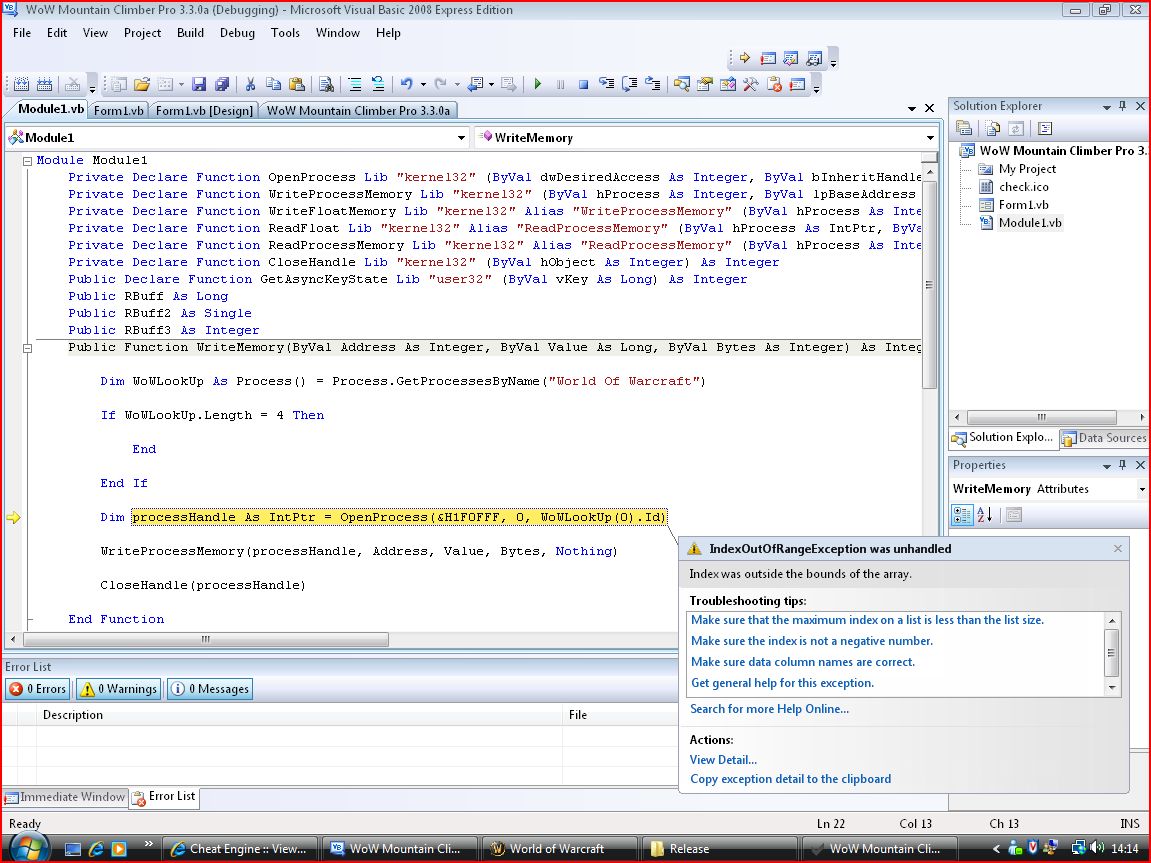
Thanks man, No warning. gonna test this out.
EDIT: I run debug and this happened when I activated the hack
| Description: |
|
| Filesize: |
216.92 KB |
| Viewed: |
10764 Time(s) |
|
|
|
| Back to top |
|
|
iPromise
Grandmaster Cheater
![]() Reputation: -1 Reputation: -1
Joined: 27 Jun 2009
Posts: 529
Location: Canada
|
| Posted: Fri Feb 12, 2010 9:45 am Post subject: |
|
|
Change
| Code: |
Private Declare Function OpenProcess Lib "kernel32" (ByVal dwDesiredAccess As Integer, ByVal bInheritHandle As Integer, ByVal dwProcessId As Integer) As Integer
|
To
| Code: |
Private Declare Function OpenProcess Lib "kernel32" (ByVal dwDesiredAccess As Integer, ByVal bInheritHandle As Integer, ByVal dwProcessId As Integer) As IntPtr
|
+Rep me if i'm helping you.
|
|
| Back to top |
|
|
AtheistCrusader
Grandmaster Cheater
![]() Reputation: 6 Reputation: 6
Joined: 23 Sep 2006
Posts: 681
|
| Posted: Fri Feb 12, 2010 12:52 pm Post subject: |
|
|
| iPromise wrote: | Change
| Code: |
Private Declare Function OpenProcess Lib "kernel32" (ByVal dwDesiredAccess As Integer, ByVal bInheritHandle As Integer, ByVal dwProcessId As Integer) As Integer
|
To
| Code: |
Private Declare Function OpenProcess Lib "kernel32" (ByVal dwDesiredAccess As Integer, ByVal bInheritHandle As Integer, ByVal dwProcessId As Integer) As IntPtr
|
+Rep me if i'm helping you. |
Lmao rep whoring much?
|
|
| Back to top |
|
|
FullyAwesome
I post too much
![]() Reputation: 0 Reputation: 0
Joined: 05 Apr 2007
Posts: 4438
Location: Land Down Under
|
| Posted: Fri Feb 12, 2010 3:53 pm Post subject: |
|
|
yeah just skip over my comment and go to the guy who thinks rep means something. :\
| FullyAwesome wrote: | | change Function to Sub (both for "Public Function" and "End Function"). if you're going to return a value you'd use a Function. don't use iPromises way unless you actually want to return an integer. :\ |
i also seriously doubt the process name would be World Of Warcraft.exe, so WoWLookUp(0) won't exist, so it'll tell you index 0 is outside of the array's range. i'd assume that it'd be something like wow.exe (where the window title might be World of Warcraft). you have a check to see if the array is of length 4, why wouldn't you have a check to see if it's of length 0...?
lol @ iPromise's answer again. xD even though it should be IntPtr, it's not going to fix that error. :\
_________________
|
|
| Back to top |
|
|
hcavolsdsadgadsg
I'm a spammer
![]() Reputation: 26 Reputation: 26
Joined: 11 Jun 2007
Posts: 5801
|
| Posted: Fri Feb 12, 2010 4:57 pm Post subject: |
|
|
| MΣGŃσ& wrote: | | EDIT: I run debug and this happened when I activated the hack |
Use the debugger.
Set breakpoints (by clicking on the left margin) and step through your code.
BUT LETS SEE ANYWAY:
http://msdn.microsoft.com/en-us/library/system.diagnostics.process.getprocessesbyname.aspx
| Quote: | Return Value
Type: System.Diagnostics.Process[]
An array of type Process that represents the process resources running the specified application or file.
Use this method to create an array of new Process components and associate them with all the process resources that are running the same executable file on the local computer. The process resources must already exist on the computer, because GetProcessesByName does not create system resources but rather associates them with application-generated Process components. A processName can be specified for an executable file that is not currently running on the local computer, so the array the method returns can be empty.
and...
The process name is a friendly name for the process, such as Outlook, that does not include the .exe extension or the path. GetProcessesByName is helpful for getting and manipulating all the processes that are associated with the same executable file. For example, you can pass an executable file name as the processName parameter, in order to shut down all the running instances of that executable file. |
Sure as shit:
| Code: | Process[] p = Process.GetProcessesByName("OBVIOUSLY_FAKE_NAME");
string dong = p[0].ToString(); //OH FFF, nothing's there! (since there was no existing process)
//'System.IndexOutOfRangeException', tried to access what doesn't exist. |
Problem solved. You're trying to access what doesn't exist because there was no process by that name to retrieve info from.
HELP HOW DO I FIX IT:
Fix your process name, read above.
B-b-but what do I do if it's wrong again or it's not running!?
Check to make sure the array isn't empty. Exceptions are expensive, an easier and faster way is to just do:
| Code: | | if(arrayname.Length != 0)... |
|
|
| Back to top |
|
|
. . ,
Master Cheater
![]() Reputation: 3 Reputation: 3
Joined: 05 Nov 2009
Posts: 337
|
| Posted: Sat Feb 13, 2010 10:18 pm Post subject: |
|
|
I changed the "World Of Warcraft" to Wow. And I get no error but it doesnt work
Heres taskmanager what it shows as
Processes Tab:
Wow.exe
Applications Tab:
World Of Warcraft
|
|
| Back to top |
|
|
hcavolsdsadgadsg
I'm a spammer
![]() Reputation: 26 Reputation: 26
Joined: 11 Jun 2007
Posts: 5801
|
| Posted: Sat Feb 13, 2010 10:20 pm Post subject: |
|
|
Use the debugger holy shit it's there for a reason
GET FAMILIAR WITH IT, IT WILL SAVE YOU AN INFINITE AMOUNT OF TIME AND GRIEF
|
|
| Back to top |
|
|
. . ,
Master Cheater
![]() Reputation: 3 Reputation: 3
Joined: 05 Nov 2009
Posts: 337
|
| Posted: Mon Feb 15, 2010 4:17 am Post subject: |
|
|
| slovach wrote: | Use the debugger holy shit it's there for a reason
GET FAMILIAR WITH IT, IT WILL SAVE YOU AN INFINITE AMOUNT OF TIME AND GRIEF |
debugger? wtf u on it doesnt work weather I use that or not.
| FullyAwesome wrote: | yeah just skip over my comment and go to the guy who thinks rep means something. :\
| FullyAwesome wrote: | | change Function to Sub (both for "Public Function" and "End Function"). if you're going to return a value you'd use a Function. don't use iPromises way unless you actually want to return an integer. :\ |
i also seriously doubt the process name would be World Of Warcraft.exe, so WoWLookUp(0) won't exist, so it'll tell you index 0 is outside of the array's range. i'd assume that it'd be something like wow.exe (where the window title might be World of Warcraft). you have a check to see if the array is of length 4, why wouldn't you have a check to see if it's of length 0...?
lol @ iPromise's answer again. xD even though it should be IntPtr, it's not going to fix that error. :\ |
How do I check the lenght?
|
|
| Back to top |
|
|
hcavolsdsadgadsg
I'm a spammer
![]() Reputation: 26 Reputation: 26
Joined: 11 Jun 2007
Posts: 5801
|
| Posted: Mon Feb 15, 2010 4:44 am Post subject: |
|
|
| MΣGŃσ& wrote: | | slovach wrote: | Use the debugger holy shit it's there for a reason
GET FAMILIAR WITH IT, IT WILL SAVE YOU AN INFINITE AMOUNT OF TIME AND GRIEF |
debugger? wtf u on it doesnt work weather I use that or not. |
it means learn to debug your programs you dope not just run a debug build and hope for magic.
how do you think you get a better look at what is actually happening in your code? just because you wrote it doesn't mean it works as expected.
the first hit for 'visual studio debug tutorial' on google brings:
http://dotnetperls.com/debugging-1 which looks like a decent enough crash course, though it doesn't go into detail
| MΣGŃσ& wrote: | | How do I check the lenght? |
read my post.
|
|
| Back to top |
|
|
|
|
You cannot post new topics in this forum
You cannot reply to topics in this forum
You cannot edit your posts in this forum
You cannot delete your posts in this forum
You cannot vote in polls in this forum
You cannot attach files in this forum
You can download files in this forum
|
|
 FAQ
FAQ Search
 Memberlist
 Usergroups
 Register
 Profile
 Log in to check your private messages
 Log in


